งานรีโนเวทที่เห็น
ความคืบหน้าทุกช็อต
วางแผนรีโนเวทบ้านไทยด้วยภาพ Before และ After พร้อมคุมมุมกล้องและความต่อเนื่องของงาน
มีไอเดียก็เริ่มได้
ให้เครื่องมือช่วยเรียบเรียง
เลือกเรื่องราว ประเภทพื้นที่ และงานรีโนเวท เตรียมภาพ Before กับ After แล้วให้เครื่องมือช่วยวางแผน เลือกคีย์เฟรม และเรนเดอร์บน Google Flow
- กดรับ License Key
- คัดลอก Key หรือข้อความที่ต้องการ
- เปิดเครื่องมือ Google Flow เพื่อวางใช้งาน
หน้านี้เป็นจุดรับ Key และคลังอ้างอิง การสร้างภาพและวิดีโอทำในเครื่องมือ Google Flow
เลือกแนวทางที่อยากสร้าง
รวบรวมข้อความจากเอกสารจริง ทั้ง Prompt, Template และค่าพรีเซ็ต โดยระบุชนิดและไฟล์อ้างอิงแต่ละรายการ
Glossy epoxy corridorpreset
Preset ต้นฉบับ · ค่าตั้งต้นและคำสั่งที่เอกสารระบุ · 0004-home-renovation-en.md
| ⭐ Glossy epoxy corridor | a1 b1 c1 d1 e2 f1 f6 f8 g1 h1 i1 j1 k1 l1 l3 l5 m1 n2 o1 p1 q1 r1 s1 t1 u1 v1 w1 w2 w3 w4 | 6 × 6 = 36 s |

Source prompt fragments:
pure satisfying transformation, every second shows dirt turning clean
rolling a glossy epoxy floor coating over prepared cement
long narrow side corridor beside a Thai townhouse
narrow space about 1.5 by 8 meters
dirty worn surfaces with stains, dust and peeling paint
peeling flaking old paint
hairline cracks across the cement
old buckets, bricks and broken chairs left along the wall
mirror-glossy grey epoxy floor reflecting the light
freshly painted clean white walls
a few green potted tropical plants
grey, white and leafy green palette
two Thai workers in blue shirts and red rubber boots
a sharp line between dirty and clean surface
workers blurred by fast timelapse motion
glossy floor reflecting the light and walls
old Thai townhouse row in a narrow soi
bright natural daylight
dry clear day
locked tripod high in the corner looking down the full length
ultra wide angle 14mm, whole space in frame
workers immediately dragging junk out of the dirty space
the final glossy coat sweeping the whole floor in one pass
spotless finished space with green plants, organized and cozy
hyper-speed timelapse with motion blur on workers
the transformation travels from the far end toward the camera
no camera shake, no camera movement
no person looking at the camera
no slow motion unless requested
no text, no watermark, no logos
Deck tile balconypreset
Preset ต้นฉบับ · ค่าตั้งต้นและคำสั่งที่เอกสารระบุ · 0004-home-renovation-en.md
| Deck tile balcony | a3 b2 c2 d2 e1 f2 f9 g3 h2 i1 i2 i5 j2 k1 l4 l6 m6 n2 o1 p6 q2 r5 s5 t4 u6 v4 w1 w2 w3 w4 | 6 × 6 = 36 s |

Source prompt fragments:
low-budget weekend upgrade with a striking result
clicking interlocking wood deck tiles over bare concrete
small upper-floor balcony with a white wall and railing
compact space about 2 by 4 meters
bare dull grey concrete, dusty but empty
black water and grease stains
orange rust streaks under metal railings
warm wood-look interlocking deck tiles
warm cream painted walls
a few green potted tropical plants
hanging plants along the railing
warm string lights overhead
warm wood and white palette
two Thai workers in blue shirts and red rubber boots
deck tiles clicking into place one by one
plants set down as the final touch
Bangkok condo balcony with city towers behind
bright natural daylight
dry clear day
locked from the balcony corner showing floor and railing
wide 18mm, whole space in frame
the first deck tile clicks onto bare concrete
the final deck tile locking in, deck complete
cozy styled space with a chair, rug and plants
pieces snap into place step by step
the change spreads from one corner outward
no camera shake, no camera movement
no person looking at the camera
no slow motion unless requested
no text, no watermark, no logos
Flood kitchen rescuepreset
Preset ต้นฉบับ · ค่าตั้งต้นและคำสั่งที่เอกสารระบุ · 0004-home-renovation-en.md
| Flood kitchen rescue | a2 b3 c3 d3 e4 f2 f5 f7 g5 h5 i8 j3 k2 l1 l2 m7 n4 o1 p3 q1 r2 s3 t2 u3 v2 w1 w2 w3 w4 w5 | 6 × 6 = 36 s |

Source prompt fragments:
dramatic rescue of a ruined neglected space, hopeless to hopeful
scrubbing mud and grease away after a flood
small old Thai back kitchen with tiled walls, a sink, a tiled counter and a gas stove
compact space about 3 by 3 meters
thick brown flood mud, grease and water lines on the walls
black water and grease stains
layer of drying brown mud
black mold patches on the lower walls
clean bright white floor tiles, grout lines crisp
the original wall tiles scrubbed to like-new
an organized open storage shelf
bright white with chrome accents
one Thai worker with a bucket and scrubbing brush
a sharp line between dirty and clean surface
water splashing and sheeting across the floor
riverside Thai house in a flood-prone area
flat indoor fluorescent light mixed with window daylight
dry clear day
locked three-quarter view from the doorway
ultra wide angle 14mm, whole space in frame
the first scrub stroke reveals a clean stripe in the mud
the last mud rinsed off and the tiles shining
sunlight gliding across the glossy new floor
satisfying wipe transformation along a moving dividing line
clean strips appear side by side
no camera shake, no camera movement
no person looking at the camera
no slow motion unless requested
no text, no watermark, no logos
no After items appear before their scene
Overgrown yard clearpreset
Preset ต้นฉบับ · ค่าตั้งต้นและคำสั่งที่เอกสารระบุ · 0004-home-renovation-en.md
| Overgrown yard clear | a4 b4 c4 d5 e5 f3 f4 f8 g8 h8 i1 i4 j4 k6 l3 l9 m4 n1 o4 p1 q2 r4 s6 t7 u1 v7 w1 w2 w3 w4 | 5 × 6 = 30 s |

Source prompt fragments:
overgrown space reclaimed from nature, revealing what was hidden
raking, cutting and bagging weeds and dry leaves
small walled backyard behind a Thai house
open yard about 6 by 10 meters
waist-high weeds, vines and piles of dry leaves
weeds growing through cracks
piles of dry brown leaves
old buckets, bricks and broken chairs left along the wall
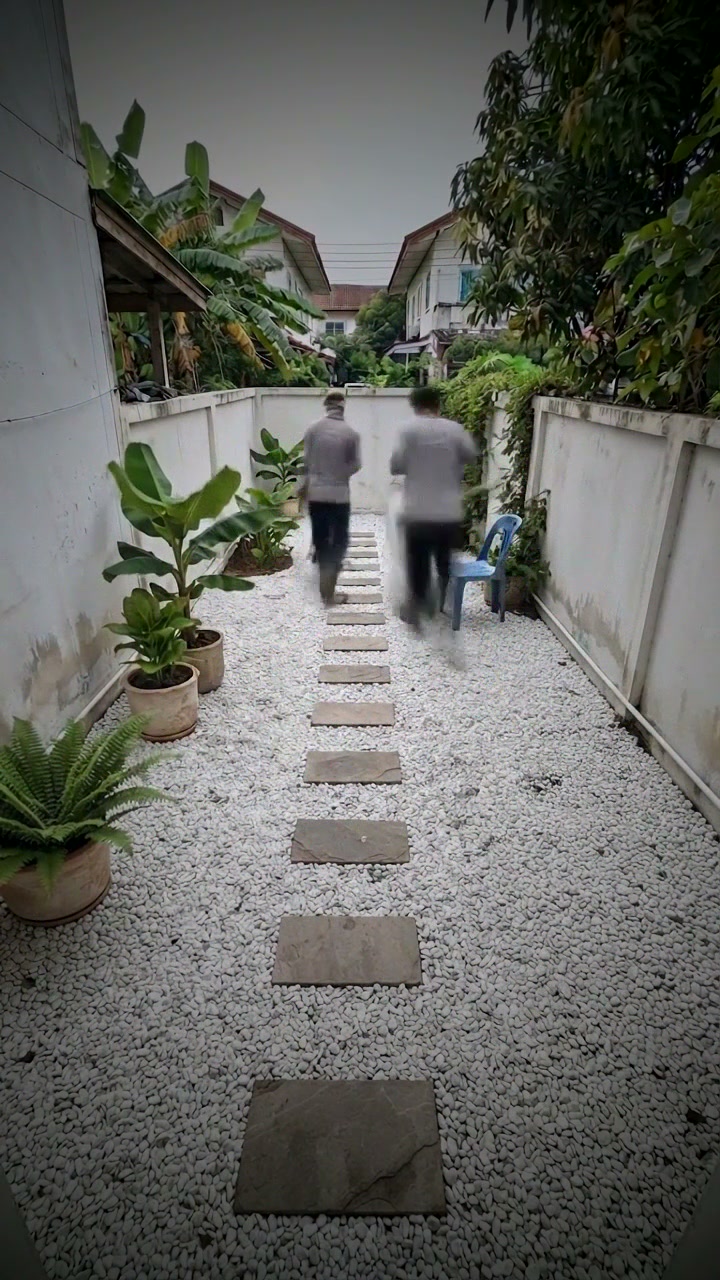
white gravel with flat stepping stones
walls stay as they are, only the ground changes
a few green potted tropical plants
clean stainless drain cover
earth brown and fresh green palette
two Thai workers with rakes and black garbage bags
workers blurred by fast timelapse motion
black garbage bags piling up by the gate
Thai village house with banana and mango trees
soft early morning light
after tropical rain, wet reflective ground
locked tripod high in the corner looking down the full length
wide 18mm, whole space in frame
a clump of weeds ripped out with dust flying
the whole ground revealed clean after the last bag
a Thai family walks in barefoot to enjoy the space
hyper-speed timelapse with motion blur on workers
the area nearest the camera is cleared first
no camera shake, no camera movement
no person looking at the camera
no slow motion unless requested
no text, no watermark, no logos
Pressure wash walkwaypreset
Preset ต้นฉบับ · ค่าตั้งต้นและคำสั่งที่เอกสารระบุ · 0004-home-renovation-en.md
| Pressure wash walkway | a1 b5 c6 d6 e3 f2 f3 g7 h8 i1 j5 k4 l1 l8 m2 n2 o1 p2 q5 r3 s2 t2 u7 v1 w1 w2 w3 w4 | 4 × 6 = 24 s |

Source prompt fragments:
pure satisfying transformation, every second shows dirt turning clean
high-pressure water washing moss and grime off concrete
concrete walkway from the gate to the front door
long path about 1.2 by 12 meters
green moss and black grime covering the surfaces
black water and grease stains
weeds growing through cracks
clean even light-grey concrete
walls stay as they are, only the ground changes
a few green potted tropical plants
natural concrete grey palette
a Thai man in boots with a high-pressure washer
a sharp line between dirty and clean surface
moss vanishing under the water jet
tidy Thai suburban housing estate
bright natural daylight
dry clear day
locked one-point perspective from the far end, eye level
50mm compressing the long path
the water jet cuts a clean line through the moss
the last strip of moss disappearing
sunlight gliding across the glossy new floor
key action in real-time detail then hyperlapse
the transformation travels from the far end toward the camera
no camera shake, no camera movement
no person looking at the camera
no slow motion unless requested
no text, no watermark, no logos
Front wall repaintpreset
Preset ต้นฉบับ · ค่าตั้งต้นและคำสั่งที่เอกสารระบุ · 0004-home-renovation-en.md
| Front wall repaint | a5 b6 c9 d7 e7 f1 f2 f7 g7 h3 i1 i3 j6 k5 l3 l7 m2 n2 o1 p5 q6 r7 s4 t5 u3 v5 w1 w2 w3 w4 | 6 × 6 = 36 s |

Source prompt fragments:
tired old Thai house refreshed to look newly built
scraping, priming and repainting faded walls
front wall and small porch of a single-story Thai house
house front about 6 meters wide
abandoned for years, cracked, faded and neglected
peeling flaking old paint
black water and grease stains
black mold patches on the lower walls
clean even light-grey concrete
light grey walls with crisp white trim
a few green potted tropical plants
a small wooden bench
cream and terracotta palette
a Thai worker with a long-handled paint roller
workers blurred by fast timelapse motion
a fresh paint stripe from the roller
tidy Thai suburban housing estate
bright natural daylight
dry clear day
locked straight-on frontal view
architectural framing with perfectly vertical lines
old paint flakes scraped off in one long stroke
the last wall coat covering the old color
clean held final frame with empty space for text
satisfying wipe transformation along a moving dividing line
the change moves from the top of the wall down
no camera shake, no camera movement
no person looking at the camera
no slow motion unless requested
no text, no watermark, no logos
4.2 Field "Renovation story and vision"prompt
ข้อความต้นฉบับ · 0004-home-renovation-en.md
Renovate a long narrow corridor beside an old Thai townhouse in Thailand, about 1.5 by 8 meters, filmed from one fixed tripod in the corner. Before: grey cement floor with peeling old paint, dust, dead leaves, black stains and old junk along the wall. Two Thai workers in blue shirts and red rubber boots clear the junk, sweep, scrape the old paint, patch the cracks, roll on primer, then roll on a glossy grey epoxy coat in long satisfying strokes. After: a spotless mirror-like grey epoxy floor reflecting the daylight, clean white walls, a few green potted plants, organized and cozy.
4.4.1 Draw with AI prompts (MUST)template
ข้อความต้นฉบับ · 0004-home-renovation-en.md
Edit the reference photo (the Before photo). Keep the exact same camera position, framing, lens, walls, windows and background. {SPACE_GUARD}
Make it the clean finished space: floor {g}, walls {h}, details {i[]}, palette {j}, clearly visible {l[] result items, e.g. l1, l5, l6}. Remove all dirt, junk, tools and workers.
Light: {n}. Story notes (lower priority than everything above): {story}
Avoid: {w[]}. {SINGLE_FRAME_SUFFIX}4.4.1 Draw with AI prompts (MUST)template
ข้อความต้นฉบับ · 0004-home-renovation-en.md
Edit the reference photo (the After photo of the real place). Keep the exact same camera position, framing, lens, walls, windows, doors, railing, background and every fixed detail identical. {SPACE_GUARD}
Turn it back into the starting state before the renovation: {e}, {f[]}, amount {ee}, mood {ed}. Floor: {ea}. Walls: {eb}. Left behind: {ec[]}.
Remove the finished work: floor {g}, walls {h}, details {i[]}; where something is removed, show the old surface naturally (no ghost shadows, no outlines, no blank patches).
Light: {beforeLight}. No workers. Avoid: {w[]}. {SINGLE_FRAME_SUFFIX}4.4.1 Draw with AI prompts (MUST)template
ข้อความต้นฉบับ · 0004-home-renovation-en.md
Photorealistic photograph of {c}. The space type must be exactly this. {SPACE_GUARD}
Size: {d}. Condition: {e}, {f[]}, amount {ee}, mood {ed}. Floor: {ea}. Walls: {eb}. Left behind: {ec[]}.
Location: {m}, in Thailand. Light: {beforeLight}. Weather: {o} (skip for indoor spaces). Camera: {p}, {q}.
No workers. Avoid: {w[]}. {SINGLE_FRAME_SUFFIX}6.2 Generation pool (MUST)template
ข้อความต้นฉบับ · 0004-home-renovation-en.md
You check storyboard keyframes for scene {n} of a locked-tripod home renovation timelapse in Thailand.
Image A = the After image (layout target, for checking only). Image 0 = the image this scene was edited from (scene 1: the Before photo). Images 1–3 = candidates.
Expected change: {visibleChange}. Adds: {adds}. Removes: {removes}. Crew action: {crewAction}. Positions: {layout}. Never changes: {fixedItems}.
For each candidate set false when:
singleFrame — collage, grid, split screen, several panels, border, inset, or a visible tripod;
spaceMatch — a different space or room type than {c};
sameAngle — a different camera position, framing or lens than image 0;
progressVisible — looks the same as image 0, or shows items planned for later scenes (scene 1: shows the finished space);
layoutMatch — an item stands in a different place, side, size or orientation than in image A / Positions;
environmentMatch — anything outside Adds/Removes differs from image 0 (background, sky, far end, walls, awnings, dish, wires, windows, neighbours' buildings, light direction).
Rank the remaining candidates by: smooth continuation of image 0 · nothing built disappears, no dirt returns · change clearly visible · no text, no distorted people or tools, Thai people and setting · beauty.
Reply: {"pick": 1|2|3|0, "reason": "max 12 words", "singleFrame": [..3], "spaceMatch": [..3], "sameAngle": [..3], "progressVisible": [..3], "layoutMatch": [..3], "environmentMatch": [..3]} (0 = none valid → redraw)9.2 System instructiontemplate
ข้อความต้นฉบับ · 0004-home-renovation-en.md
You are a director of viral ASMR home renovation timelapses of small spaces in Thai houses. Formula: one locked camera + filthy Before + fast satisfying work + spotless After.
Plan backwards from the After (finish → base coats and repairs → cleaning → junk removal → Before), then OUTPUT THE SCENES IN FORWARD BUILD ORDER: scene 1 = the Before photo plus the first action (progress 10–20 %); the finished After appears only in the last scene. Never start from the After state.
Rules:
1. LOCKED TRIPOD: same angle, framing and lens in every scene; no camera movement, no zoom (only extension scenes may move, and the plan never contains them).
2. anchorBlock (English, includes "in Thailand"): angle, framing, light = beforeLight, weather, location, space, palette. Used only in buildPrompt, identical in every scene.
3. promptMod (every scene, scene 1 included) = "Change only: <visibleChange>" + positions of its adds. ONE moment, one single full-frame photograph; never the words before, after, transformation, timelapse, hyperlapse, sequence, stages, step by step, progress, then.
4. First write layoutMap (positions from the After image), fixedItems (everything outside the job that never changes, with positions, from the Before photo) and inventory.addItems / removeItems (After notes win over story). Assign every item to exactly one scene (adds / removes); progress rises to 100.
5. Arc: scene 1 Hook with immediate motion · Work scenes one clear change each, similar size · second-to-last Climax ≥ 85 % · last Reveal = 100 %, every add present, every remove gone, no workers, boxes or tools; matches the After image's finish (its composition only if afterAngleMatch).
6. visibleChange and transformationStep (≤ 6 words) name real items with positions; never "Step N" or generic text; no two scenes alike. Workers change position and task (crewAction); junk shrinks; tools leave before the Reveal.
7. CONTINUITY: fixedItems never change; cleaned stays clean; installed stays; items never move. Light constant until the Reveal.
8. buildPrompt: "Fixed tripod camera, no camera movement. Start: … Action: … in hyper-speed timelapse … End: exactly matches … Background and lighting unchanged." naming this scene's adds.
9. Thai people in Thai workwear; Thai houses, tiles, plants, buckets, brooms, power poles. Nobody looks at the camera. No text, watermark, signage, prices or view counts.
10. DIALOGUE only if the dialogue option is on and a person is in the scene: English line, polite, max 5/8/10/12 words for 4/6/8/10 s; append 'The Thai [role] says in Thai: "<dialogue>"'. Otherwise dialogue = "" and add "no speech, ASMR renovation sounds only".
11. ASMR: textures of dirt, water, cement, epoxy, wood, tile, leaves + one micro-detail per scene. Change size fits the duration; duration is exactly 4, 6, 8 or 10 (default {y}).
12. Use every selected option and every "Always avoid" item. All fields English. JSON only, no backticks.9.3 User prompttemplate
ข้อความต้นฉบับ · 0004-home-renovation-en.md
Story: {story} · Before notes: {beforeNotes} · Target After notes: {afterNotes}
Angle {a} · Job {b} · Space {c} · Size {d} · Before {e}, {f[]} · After floor {g} · walls {h} · touches {i[]} · palette {j}
Crew {k} · Must-see {l[]} · Anchor input: {p}, {q}, light {beforeLight}, {o}, {m}, {c}, {j}, in Thailand
Hook {r} · Climax {s} · Reveal {t} · Motion {u} · Pattern {v} · Avoid {w[]} · Scenes {x} · Seconds {y}
People: Thai lead worker = {pa}, Thai helper/owner = {pb} · Dialogue: {sd}9.4 Output JSONprompt
โครงสร้าง JSON ต้นฉบับ · 0004-home-renovation-en.md
{
  "projectType": "short name", "overviewSummary": "1–2 sentences",
  "layoutMap": [{ "item": "bench", "position": "right wall, near the far end" }],
  "fixedItems": ["left wall: cream render", "satellite dish top right", "far end: gate to the street", "sky: hazy white"],
  "inventory": { "addItems": ["…"], "removeItems": ["dirt, junk, tools, workers …"] },
  "anchorBlock": "Fixed tripod camera, high corner looking down the length, ultra wide angle 14mm, bright natural daylight, dry clear day, narrow side corridor of an old townhouse in a soi in Thailand, grey white and green palette, photorealistic",
  "leadBuilderDesc": "…", "siteExpertDesc": "…", "beforeDesc": "…", "finalPropertyDesc": "…",
  "scenes": [{
    "sceneNumber": 1, "beat": "Hook | Work | Climax | Reveal", "transformationStep": "≤ 6 words",
    "constructionScript": "what is visible", "visibleChange": "concrete change with positions",
    "adds": ["…"], "removes": ["…"], "progress": 15, "crewAction": "what the workers do",
    "dialogue": "", "asmrDetail": "…", "crew": "No Crew | Builder | Expert | Full Crew", "duration": 6,
    "promptMod": "Change only: …; positions: …",
    "buildPrompt": "Fixed tripod camera, no camera movement. Start: … Action: … End: …"
  }]
}9.7 💡 10 viral ideas prompt (JSON only)template
ข้อความต้นฉบับ · 0004-home-renovation-en.md
Act as a viral timelapse idea generator for low-cost Thai house renovation. Generate 10 different ideas: fixed tripod, satisfying transformation, Before {dirty state} -> Action {fast work by Thai workers} -> After {clean beautiful result}, in Thailand, no camera movement. Mix: epoxy floor, deck tiles, kitchen cleaning, pressure washing, garden clean-up, wall repaint, re-tiling, mold removal, junk clear-out, artificial grass. No two ideas share space and job. Use option codes from: {codes and labels a–v}.
Reply: [{"title": "max 5 words", "line": "Before -> Action -> After, max 25 words", "story": "60–90 words, includes in Thailand", "codes": {"a": "a1", …}}]9.8 ✨ AI suggest prompt for extension scenes (JSON only)template
ข้อความต้นฉบับ · 0004-home-renovation-en.md
You see the last frame of a finished home renovation video in Thailand. Suggest 3 short follow-up scenes that keep the space exactly as it is and make the ending more satisfying (camera showcase, light change, people or life moments). Codes: xa, xb, xc, xd (multi), xe (4|6|8|10), xf. Labels: {xa–xf labels}.
Reply: [{"title": "max 5 words", "text": "max 25 words", "codes": {"xa": "xa1", "xb": "xb2", "xc": "xc1", "xd": ["xd1"], "xe": 6, "xf": "xf1"}}]ไม่พบรายการ ลองเปลี่ยนคำค้นหรือปิดตัวกรองรายการโปรด
ลองเปลี่ยนตัวแปร เห็นข้อความทันที
ใช้ Template จากเอกสารต้นฉบับ ช่องที่แสดงตรงกับตัวแปรในรายการที่เลือก
ดูจังหวะ ค่อยต่อยอดเป็นงานของคุณ
เลือกคลิป ปรับความเร็ว หรือขยายภาพเพื่อดูรายละเอียดของผลงานตัวอย่าง
อ่านคู่มือต้นฉบับ
อ่านรายละเอียดคู่มือต้นฉบับได้ด้านล่าง
0004-home-renovation-en.md
Thai Home Renovation Timelapse Builder — Tool Spec
Base app: "ASMR Exterior Builder" (4 tabs: Story → Script → Board → Video). Keep its flow, logic and Flow SDK calls. Change: all option sets below, the "finished building" logic becomes Before → Action → After renovation logic, and every <select> becomes buttons.
Option format: code ⭐ = default · UI label — prompt fragment (sent to the image/video model, never shown as UI text). Every section marked MUST is required; the checklist (12) lists them.
0. Rules (MUST)
- All UI text and all AI-generated text shown to the user are English, exactly as written here. No translation layer. Prompts to image/video models are English.
- Thai context: all people are Thai (Thai faces, Thai workwear: blue work shirts, red rubber boots, cotton gloves, bucket hats); the house is in Thailand (Thai townhouse, Thai tiles, roller shutters, Thai power poles, tropical plants, Thai plastic buckets and brooms). Every Anchor block contains
in Thailand; every person prompt containsThai. - Spoken dialogue is Thai: the AI writes the line in English (
dialogue), the video prompt saysthe Thai worker says in Thai: "<line>". Max words by shot length: 5 (4 s) · 8 (6 s) · 10 (8 s) · 12 (10 s); polite, friendly. - Units: meters, m², baht.
- Low-cost Thai house renovation only: cleaning, coating, tiling, decking, painting, garden clearing. No structural demolition, no new building.
- Click feedback is not optional (do not skip): every work button uses
<ActionButton>and every card uses<CardStatus>(2.1). A build without this is incomplete.
1. Concept
An app that creates viral, shot-by-shot ASMR renovation timelapses of small Thai home spaces — corridors, balconies, kitchens, yards, walkways — from one locked tripod angle. The user clicks buttons to choose the job, the space, how dirty the Before is, the After finish, the crew, light and story beats. The AI plans real renovation steps between the Before photo and the After image, writes the script, makes 3 storyboard images per scene and renders frame-to-frame videos: filthy Before → fast satisfying work → spotless After.
- App title: "Thai Home Renovation — ASMR Timelapse Builder"
- Subtitle: "Pick the mess, the job and the finish, and let AI turn one locked shot into a satisfying before-and-after clip."
Project facts (viral formula from the source): locked tripod, ultra-wide, one corner angle · Before = dirty, moldy, flooded, overgrown or cluttered · Action = 1–3 Thai workers in blue shirts and red boots working in hyper-speed with motion blur · After = clean, glossy, organized, with plants · natural daylight · 9:16 · 4K photorealistic · reference hits 89K / 76.7K / 72.4K / 5.9K views (reference only, never in prompts) · jobs: epoxy floor, interlocking deck tiles, post-flood kitchen clean, overgrown yard clear, pressure washing.
Key features (info modal): ✨ Start with AI — one click: images → analysis → plan → Script tab · Click-only — 50 option groups, no dropdowns · 6 one-click presets — 5 proven viral recipes + front wall repaint · Real renovation order — clear out → clean → repair → prime → finish → style → reveal · One locked shot — same angle, walls, light; only the mess changes · Built to be watched to the end — moving dirty hook → first clean stripe → glossy climax → styled reveal · 💡 10 viral ideas · Thai crew, Thai dialogue (optional).
2. Button UI rules
- Single choice = radio chips. Multi choice = toggle chips with ✓ (
f,i,l,w,ec,ba–bd,vb,xd). Numbers = number buttons +−+(x). Shot length (y, per-scene "Shot length",xe) = chips4 s·6 s·8 s·10 sonly. - No
<select>anywhere. Long groups wrap or use a carousel. - Group header:
code · group name · current value+✨ AI pick·↺ Default·+ Custom. - Tab-level:
🎲 Random matching set(coherent combos only, e.g. neverb5pressure washing withg3deck tiles) · presets (4.1) ·💡 10 viral ideas(4.2). - Unavailable options dimmed + tooltip: "Omni 1.1 Flash only" · "Not for indoor spaces" (weather
o3–o6whencis inINDOOR_SPACES) · "Indoor spaces only" (n4,ef5whencis outdoor). - Group codes: Story
a–y· Before builderea–eg· Enginesza–zd· Peoplepa–pb· Scriptsa–sd· Boardba–bd· Videova–vd· Extensionxa–xf.
2.1 Click feedback — implementation contract (MUST — do not skip, do not simplify)
<ActionButton> — every button in the table below (no plain <button> for these):
type BtnState = 'idle' | 'pressed' | 'queued' | 'busy' | 'done' | 'failed';
// pressed: set synchronously in onClick BEFORE any await (darker fill + scale 0.97), within 100 ms
// queued : spinner + "Queued · starts in {eta} s"   (disabled, small ✕ cancel)
// busy   : spinner + busyLabel + elapsed "0:12"      (disabled, small ✕ cancel)
// done   : green "✓ Done" 1.5 s → idle · failed: red "⚠ Failed · ↻ Retry" (tooltip = error)
// state follows the job in the pool (6.2). Never icon-only (no lone hourglass); aria-busy while queued/busy.
<CardStatus> — on every reference card (Story, Script), Storyboard card and Video card:
type CardState = 'idle'|'waiting'|'queued'|'generating'|'checking'|'locked'|'rendering'|'done'|'failed'|'cancelled';
// top-right chip, always visible: waiting (grey, no spinner) "Waiting for scene 2 pick" · queued (blue) "Queued #2 · starts in 4 s"
// generating (amber) "Generating 2/3 · 0:18" · checking "Checking images…" · rendering "Rendering video · 0:41 / 3:00"
// locked/done (green) "Locked #2" / "Done" · failed (red) "Failed · Retry"
// while working: glowing border + thin progress bar; each option slot: shimmer + spinner + "#2 generating… 0:09";
// a finished slot appears at once (do not wait for all 3)
Buttons that MUST use it (busy label in brackets):
| Tab | Buttons |
|---|---|
| Header / pool | Download all (N) ("Downloading 3/6…") · 🧹 Clear stuck · ⏹ Stop all ("Stopping…") · Follow progress toggle |
| Story | ✨ Start with AI (stepper label, e.g. "Drawing After… 0:14") · Generate renovation plan ("Planning…") · Draw with AI on Before / After / Before builder ("Drawing…") · Analyze ("Analyzing…") · 💡 10 viral ideas ("Thinking…") · ✨ AI pick ("Picking…") · 🎲 Random… (pressed + done) |
| Script | reference bar buttons · ↻ Re-plan ("Planning…") · Rewrite description ("Rewriting…") |
| Storyboard | Generate storyboard / ↻ Generate 3 new ("Generating 0/3…") · slot ↻ · ✨ Suggest best ("Checking…") · ✓ Lock scene … & generate scene … · ↻ Update from previous · ⟲ Reset scene · slot ✕ Cancel / ↻ Retry / ⚡ Force run · click an image to lock ("✓ Locked" within 100 ms) |
| Video | Generate clip / ↻ Re-render ("Rendering… 0:41") · Render all scenes ("Rendering 2/6…") · + Add scene · ✨ AI suggest · ✨ Write motion prompt ("Writing…") · Download · ▶ Play / ⏹ Stop |
Reference badge (MUST): every option slot shows a thumbnail + Edited from: Scene 1 · #3 (scene 1: Edited from: Before photo). A storyboard image request without its reference image is not sent; the slot shows ⚠ Reference missing · ↻. Never generate a storyboard image from text alone.
Acceptance test (must pass before delivery): ① click Generate storyboard → button darker within 100 ms, then spinner "Generating 0/3…"; card chip amber; 3 slots shimmer ② clicking again while busy does nothing (no second job) ③ slots 2 and 3 count down "Starting in N s…" (6.2) ④ each image appears at once, chip counts "2/3" ⑤ a forced error shows "⚠ failed · ↻" and chip "Failed · Retry" ⑥ Generate clip shows "Rendering… 0:01" counting up, chip "Rendering video · 0:01 / 3:00", glowing border, then "✓ Done" + ▶ Play ⑦ every button in the table behaves the same.
2.2 Regenerate controls (MUST)
↻ Generate 3 newreplaces the 3 options (the locked image stays locked until a new pick); with no options yet it readsGenerate storyboard. Slot↻regenerates one slot.✎ Edit changeedits "Visible change".- "Visible change" is never empty (filled from
visibleChange); if empty, generate buttons are disabled ("Add the visible change first"). - When scene n is regenerated or re-locked, scenes n+1… made from the old image (and their videos) get the yellow badge
Ref changed+↻ Update from previous.
3. Header
Tabs 1. Story · 2. Scene Script · 3. Storyboard · 4. Video Render · counters Shots N / Locked N / Videos N · Download all (N) · pool indicator (6.2).
4. Tab 1 — Story
4.0 ✨ Start with AI — one-click start (MUST — the most prominent button of the app)
Look: full-width button at the top of the Story tab, above the presets — large (min 56 px high), gradient accent colour, icon ✨, label ✨ Start with AI, sub-label "Images → analysis → plan, in one click". The same button also sits next to Generate renovation plan in "Your selections" (4.7). It uses <ActionButton> (2.1).
One click runs, in order (each step only after the previous one succeeded; every request through the generation pool 6.2):
1. Prepare — if no option was touched, apply the ⭐ preset; if the story field is empty, fill it with the preset story. Existing images and notes are kept, never redrawn.
2. Reference images (4.4 rules, automatic mode):
- both images set → skip
- only After set → draw Before from the After photo (Before from After, 4.4.1)
- only Before set → draw After as an edit of it
- none set → draw Before from the Before builder chips, then After as an edit of it
- a draw that fails its check (space/room, angle, removal marks) is redrawn once automatically; if it fails again the run pauses (see below).
3. Analyze both images (notes + layoutMap), unless their notes already exist.
4. Angle match (4.4) — on mismatch: one automatic Redraw After from Before; if still different, pause.
5. Input check (5.1) — on conflict the run uses the default priority (After image + notes win) and shows the note "Story adjusted to the After image".
6. Generate plan — same as Generate renovation plan incl. validation and one re-plan (5.1, 9.6).
7. Open the Script tab and scroll to the top, toast "Plan ready — check the script, then go to Storyboard".
Progress panel (opens under the button while running): a vertical stepper Prepare → Draw Before → Draw After → Analyze → Check angle → Plan → Open script; each step shows ⏳ waiting · spinner + elapsed 0:12 · ✓ done · ⏭ skipped (already there) · ⚠ failed; the image steps show a live thumbnail as soon as the image arrives. Buttons ⏹ Cancel (stops after the running request; finished images are kept) and, when paused, ↻ Retry step · Fix it myself (closes the panel and scrolls to the problem).
- If a plan already exists: confirm first "A new plan replaces all current scenes, images and videos. Download your work first?" Create new plan · Cancel.
- The run never goes past the Script tab: storyboard images are still picked by the user (6.1).
4.1 Section "One-click presets"
| Preset (UI) | Values | Scenes × sec |
|---|---|---|
| ⭐ Glossy epoxy corridor | a1 b1 c1 d1 e2 f1 f6 f8 g1 h1 i1 j1 k1 l1 l3 l5 m1 n2 o1 p1 q1 r1 s1 t1 u1 v1 w1 w2 w3 w4 | 6 × 6 = 36 s |
| Deck tile balcony | a3 b2 c2 d2 e1 f2 f9 g3 h2 i1 i2 i5 j2 k1 l4 l6 m6 n2 o1 p6 q2 r5 s5 t4 u6 v4 w1 w2 w3 w4 | 6 × 6 = 36 s |
| Flood kitchen rescue | a2 b3 c3 d3 e4 f2 f5 f7 g5 h5 i8 j3 k2 l1 l2 m7 n4 o1 p3 q1 r2 s3 t2 u3 v2 w1 w2 w3 w4 w5 | 6 × 6 = 36 s |
| Overgrown yard clear | a4 b4 c4 d5 e5 f3 f4 f8 g8 h8 i1 i4 j4 k6 l3 l9 m4 n1 o4 p1 q2 r4 s6 t7 u1 v7 w1 w2 w3 w4 | 5 × 6 = 30 s |
| Pressure wash walkway | a1 b5 c6 d6 e3 f2 f3 g7 h8 i1 j5 k4 l1 l8 m2 n2 o1 p2 q5 r3 s2 t2 u7 v1 w1 w2 w3 w4 | 4 × 6 = 24 s |
| Front wall repaint | a5 b6 c9 d7 e7 f1 f2 f7 g7 h3 i1 i3 j6 k5 l3 l7 m2 n2 o1 p5 q6 r7 s4 t5 u3 v5 w1 w2 w3 w4 | 6 × 6 = 36 s |
Preset = codes + story text (MUST): a preset also replaces the story field with its matching story preset (same order as the story buttons) and clears reference images drawn for another preset. If the user typed their own story: confirm "Replace your story text with the preset story?" Replace · Keep mine.
4.2 Field "Renovation story and vision"
Default (selected options are appended before sending to AI):
Renovate a long narrow corridor beside an old Thai townhouse in Thailand, about 1.5 by 8 meters, filmed from one fixed tripod in the corner. Before: grey cement floor with peeling old paint, dust, dead leaves, black stains and old junk along the wall. Two Thai workers in blue shirts and red rubber boots clear the junk, sweep, scrape the old paint, patch the cracks, roll on primer, then roll on a glossy grey epoxy coat in long satisfying strokes. After: a spotless mirror-like grey epoxy floor reflecting the daylight, clean white walls, a few green potted plants, organized and cozy.
Story preset buttons (replace text): "Epoxy corridor" · "Deck tile balcony" · "Flood kitchen rescue" · "Overgrown backyard" · "Mossy walkway wash" · "Faded front wall repaint"
💡 10 viral ideas → 10 idea cards (title + one line + codes, prompt 9.7); Use this fills the story and applies the codes.
4.3 Section "Customize details"
a · Story angle (single, ⭐a1) - a1⭐ Pure satisfying transformation — pure satisfying transformation, every second shows dirt turning clean - a2 Rescue a ruined space — dramatic rescue of a ruined neglected space, hopeless to hopeful - a3 Cheap upgrade, big result — low-budget weekend upgrade with a striking result - a4 Nature takeover cleared — overgrown space reclaimed from nature, revealing what was hidden - a5 Old house made new — tired old Thai house refreshed to look newly built - a6 Neighbors' jaw drop — the worst-looking spot on the soi becomes the best-looking - a7 Pro crew speed run — skilled Thai crew working with fast precise efficiency - a8 Weekend DIY family — Thai family doing it themselves, warm teamwork
b · Renovation job (single, ⭐b1) - b1⭐ Epoxy floor coating — rolling a glossy epoxy floor coating over prepared cement - b2 Interlocking deck tiles — clicking interlocking wood deck tiles over bare concrete - b3 Post-flood deep clean — scrubbing mud and grease away after a flood - b4 Overgrown yard clearing — raking, cutting and bagging weeds and dry leaves - b5 Pressure washing — high-pressure water washing moss and grime off concrete - b6 Exterior wall repaint — scraping, priming and repainting faded walls - b7 Floor re-tiling — laying new ceramic floor tiles row by row - b8 Mold and stain removal — scrubbing black mold and water stains off walls and floor - b9 Junk clear-out + organize — hauling out junk and organizing the space neatly - b10 Artificial grass + gravel — laying artificial turf and gravel borders on bare soil
c · Space (single, ⭐c1) - c1⭐ Narrow side corridor — long narrow side corridor beside a Thai townhouse - c2 Small balcony — small upper-floor balcony with a white wall and railing - c3 Old kitchen (indoor) — small old Thai back kitchen with tiled walls, a sink, a tiled counter and a gas stove - c4 Backyard — small walled backyard behind a Thai house - c5 Front carport — front carport under a roof beside the gate - c6 Concrete walkway — concrete walkway from the gate to the front door - c7 Rooftop terrace — flat concrete rooftop terrace of a shophouse - c8 Laundry area — semi-open laundry area at the back of the house with a washing machine and a laundry sink - c9 Front facade + porch — front wall and small porch of a single-story Thai house - c10 Shophouse frontage — ground-floor frontage of an old Thai shophouse
d · Space size (single, ⭐d1) - d1⭐ Narrow 1.5 × 8 m — narrow space about 1.5 by 8 meters - d2 Balcony 2 × 4 m — compact space about 2 by 4 meters - d3 Small 3 × 3 m — compact space about 3 by 3 meters - d4 Medium 4 × 6 m — medium space about 4 by 6 meters - d5 Yard 6 × 10 m — open yard about 6 by 10 meters - d6 Path 1.2 × 12 m — long path about 1.2 by 12 meters - d7 Facade 6 m wide — house front about 6 meters wide
e · How bad is the Before (single, ⭐e2) - e1 Bare and dull — bare dull grey concrete, dusty but empty - e2⭐ Dirty and worn — dirty worn surfaces with stains, dust and peeling paint - e3 Moss and grime — green moss and black grime covering the surfaces - e4 Flood mud — thick brown flood mud, grease and water lines on the walls - e5 Jungle overgrown — waist-high weeds, vines and piles of dry leaves - e6 Hoarder junk pile — piled-up junk, broken furniture and sacks everywhere - e7 Abandoned for years — abandoned for years, cracked, faded and neglected
f · Before details (multi, ⭐f1 f6 f8) - f1⭐ Peeling paint — peeling flaking old paint - f2 Black stains — black water and grease stains - f3 Weeds through cracks — weeds growing through cracks - f4 Dry leaf piles — piles of dry brown leaves - f5 Mud layer — layer of drying brown mud - f6⭐ Hairline cracks — hairline cracks across the cement - f7 Mold on walls — black mold patches on the lower walls - f8⭐ Old junk — old buckets, bricks and broken chairs left along the wall - f9 Rust streaks — orange rust streaks under metal railings - f10 Puddles — shallow dirty puddles
g · After floor (single, ⭐g1) - g1⭐ Glossy grey epoxy — mirror-glossy grey epoxy floor reflecting the light - g2 Sand-beige epoxy — glossy sand-beige epoxy floor - g3 Wood-look deck tiles — warm wood-look interlocking deck tiles - g4 Grey WPC decking — grey composite decking boards - g5 Clean white tiles — clean bright white floor tiles, grout lines crisp - g6 Terrazzo-look tiles — terrazzo-look floor tiles - g7 Clean bare concrete — clean even light-grey concrete - g8 Gravel + stepping stones — white gravel with flat stepping stones - g9 Artificial grass — bright green artificial grass - g10 Polished cement — smooth polished cement floor
h · After walls & edges (single, ⭐h1) - h1⭐ Fresh white paint — freshly painted clean white walls - h2 Warm cream — warm cream painted walls - h3 Light grey + white trim — light grey walls with crisp white trim - h4 Sage green — soft sage green walls - h5 Clean original tiles — the original wall tiles scrubbed to like-new - h6 Wood slat panel — a warm wood slat feature panel on one wall - h7 Cleaned brick — cleaned exposed brick - h8 Walls unchanged — walls stay as they are, only the ground changes
i · Finishing touches (multi, ⭐i1) - i1⭐ Potted plants — a few green potted tropical plants - i2 Hanging plants — hanging plants along the railing - i3 Small bench — a small wooden bench - i4 Clean drain cover — clean stainless drain cover - i5 String lights — warm string lights overhead - i6 Outdoor rug — a neutral outdoor rug - i7 Shoe rack — a neat shoe rack by the door - i8 Storage shelf — an organized open storage shelf
j · Palette (single, ⭐j1) - j1⭐ Grey + white + green — grey, white and leafy green palette - j2 Warm wood + white — warm wood and white palette - j3 Bright white + chrome — bright white with chrome accents - j4 Earth + green — earth brown and fresh green palette - j5 Concrete natural — natural concrete grey palette - j6 Cream + terracotta — cream and terracotta palette - j7 Sage + oak — sage green and light oak palette - j8 Black + wood — matte black and warm wood palette
k · Crew & tools (single, ⭐k1) - k1⭐ 2 workers, blue shirt, red boots — two Thai workers in blue shirts and red rubber boots - k2 1 worker with bucket — one Thai worker with a bucket and scrubbing brush - k3 Team of 3 + wheelbarrow — a team of three Thai workers with a wheelbarrow - k4 Worker + pressure washer — a Thai man in boots with a high-pressure washer - k5 Worker + long roller — a Thai worker with a long-handled paint roller - k6 2 workers + rakes, bags — two Thai workers with rakes and black garbage bags - k7 Thai couple DIY — a Thai couple in casual clothes doing the work - k8 No people (magic clean) — no people, the surfaces clean and change by themselves
l · Must be clearly visible (multi, ⭐l1 l3 l5) - l1⭐ Dirty/clean dividing line — a sharp line between dirty and clean surface - l2 Water splashing — water splashing and sheeting across the floor - l3⭐ Motion blur on workers — workers blurred by fast timelapse motion - l4 Deck tile clicking in — deck tiles clicking into place one by one - l5⭐ Glossy reflection — glossy floor reflecting the light and walls - l6 Plants placed last — plants set down as the final touch - l7 Paint roller stripe — a fresh paint stripe from the roller - l8 Moss disappearing — moss vanishing under the water jet - l9 Garbage bags pile up — black garbage bags piling up by the gate - l10 Junk carried out — junk carried out of frame
m · Location & background (Thailand) (single, ⭐m1) - m1⭐ Old townhouse soi — old Thai townhouse row in a narrow soi - m2 Suburban housing estate — tidy Thai suburban housing estate - m3 Old wooden Thai house — old two-story wooden Thai house - m4 Rural village house — Thai village house with banana and mango trees - m5 Bangkok shophouse — old Bangkok shophouse street - m6 Condo balcony view — Bangkok condo balcony with city towers behind - m7 Riverside flood zone — riverside Thai house in a flood-prone area - m8 Seaside cottage — small seaside cottage with coconut palms in Thailand
n · Time & light (single, ⭐n2) - n1 Soft morning — soft early morning light - n2⭐ Natural daylight — bright natural daylight - n3 Hard noon sun — strong noon sun with crisp shadows - n4 Overhead fluorescent (indoor) — flat indoor fluorescent light mixed with window daylight - n5 Golden hour — warm golden hour sunlight - n6 Overcast soft — soft overcast diffused light - n7 Evening + warm lamps — early evening with warm lamps on
o · Weather (single, ⭐o1) - o1⭐ Dry clear day — dry clear day - o2 Hazy hot season — hazy hot Thai summer day - o3 Light breeze — light breeze moving leaves - o4 After rain, wet ground — after tropical rain, wet reflective ground - o5 Rainy season clouds — heavy rainy-season clouds - o6 Morning dew — morning dew on leaves
p · Camera angle (locked tripod) (single, ⭐p1) - p1⭐ High corner, looking down length — locked tripod high in the corner looking down the full length - p2 One-point perspective, end — locked one-point perspective from the far end, eye level - p3 Doorway 3/4 — locked three-quarter view from the doorway - p4 Low, near floor — locked low angle just above the floor - p5 Straight-on front — locked straight-on frontal view - p6 Corner of balcony — locked from the balcony corner showing floor and railing - p7 Top-down overhead — locked top-down overhead view, no camera movement
q · Framing & lens (single, ⭐q1) - q1⭐ Ultra-wide 14mm — ultra wide angle 14mm, whole space in frame - q2 Wide 18mm — wide 18mm, whole space in frame - q3 Wide 24mm — wide 24mm, slight perspective - q4 Medium 35mm, floor detail — medium 35mm emphasizing floor texture - q5 Long path compression 50mm — 50mm compressing the long path - q6 Straight verticals — architectural framing with perfectly vertical lines
r · Opening hook (single, ⭐r1) - r1⭐ Junk dragged out at once — workers immediately dragging junk out of the dirty space - r2 First scrub stripe — the first scrub stroke reveals a clean stripe in the mud - r3 Pressure jet hits moss — the water jet cuts a clean line through the moss - r4 Weeds ripped out — a clump of weeds ripped out with dust flying - r5 First deck tile clicks — the first deck tile clicks onto bare concrete - r6 1 s flash of the After (in edit) — (post) open with 1 s of the finished After - r7 Paint flakes scraped off — old paint flakes scraped off in one long stroke - r8 Bucket of water thrown — a bucket of water thrown across the dirty floor
s · Climax (single, ⭐s1) - s1⭐ Final glossy coat sweeps the floor — the final glossy coat sweeping the whole floor in one pass - s2 Last moss strip vanishes — the last strip of moss disappearing - s3 Last mud rinsed, tiles shine — the last mud rinsed off and the tiles shining - s4 Final wall coat — the last wall coat covering the old color - s5 Last deck tile locks in — the final deck tile locking in, deck complete - s6 Ground fully revealed — the whole ground revealed clean after the last bag - s7 Water sheet drains away — the rinse water draining away to show a spotless floor
t · Ending / reveal (single, ⭐t1) - t1⭐ Spotless with plants — spotless finished space with green plants, organized and cozy - t2 Sunlight on glossy floor — sunlight gliding across the glossy new floor - t3 Worker sits and rests — a Thai worker sits on the new bench and smiles - t4 Cozy styled balcony — cozy styled space with a chair, rug and plants - t5 Held frame for text — clean held final frame with empty space for text - t6 Loop to first frame — final composition mirrors the first frame for a loop - t7 Family steps in — a Thai family walks in barefoot to enjoy the space - t8 Lights on at dusk — warm lights switch on at dusk
u · Motion style (single, ⭐u1) - u1⭐ Hyper-speed timelapse — hyper-speed timelapse with motion blur on workers - u2 Smooth hyperlapse — smooth hyperlapse, steady fast progress - u3 Satisfying wipe — satisfying wipe transformation along a moving dividing line - u4 Realistic speed-up — realistic 4–8x speed-up - u5 Stop-motion ASMR — stop-motion ASMR, step by step with tiny pauses - u6 Step-by-step snapping — pieces snap into place step by step - u7 Real time then hyperlapse — key action in real-time detail then hyperlapse - u8 Morph transformation — smooth morph from dirty to clean - u9 Speed ramp — fast-forward with slow-down on the satisfying moment
v · Clean-up pattern (single, ⭐v1) - v1⭐ Back to front — the transformation travels from the far end toward the camera - v2 Strip by strip — clean strips appear side by side - v3 Tile by tile — the change appears tile by tile in rows - v4 Corner outward — the change spreads from one corner outward - v5 Top to bottom — the change moves from the top of the wall down - v6 Zone by zone — one zone at a time: left, center, right - v7 Foreground first — the area nearest the camera is cleared first
w · Always avoid (multi, ⭐w1 w2 w3 w4) - w1⭐ No camera shake — no camera shake, no camera movement - w2⭐ Nobody looks at camera — no person looking at the camera - w3⭐ No accidental slow motion — no slow motion unless requested - w4⭐ No text or logos — no text, no watermark, no logos - w5 No early After items — no After items appear before their scene - w6 No warped hands or tools — no distorted hands or tools
x · Total scenes (number 2–20, ⭐6) quick: 3 4 5 6 8 10 12
y · Seconds per shot (⭐6) chips 4 s · 6 s⭐ · 8 s · 10 s; live total "Total 6 × 6 = 36 s"
4.4 Section "Reference images — Before + After (required)" (MUST)
Two large cards side by side (half width each, preview in zd aspect, object-fit: contain), directly above "Your selections". The Script tab shows the same cards (5, same state).
| Card | Role | Notes field |
|---|---|---|
Before |
master plate: sets the camera for the whole clip; scene 1 is an edit of it | "Before notes" |
After · Target |
finished result (up to 10 images, first one used); source of layoutMap |
"Target After notes" |
- Card buttons:
Select image·Draw with AI(4.4.1) ·Analyze· round✕top-right of the image to remove (confirm "Remove this image? Scenes made from it will be marked Ref changed."). - Empty card: red dashed border, drop area "Drop or select image", label "Required".
- Both required:
Generate renovation plandisabled until both are set and analyzed ("Add the Before and After images first"); status "Reference images 2 / 2 ✓" or red "1 / 2 — add the After image". - Auto-analyze (MUST): after an image is selected or drawn,
Analyzeruns automatically (card chip "Analyzing…") and fills the notes (editable, 9.5); for After it also returnslayoutMap(5.1). Replacing an image re-runs it.Generate renovation planwaits ("Analyzing images… 1/2"). Draw with AIkeeps one camera: Before set → After = edit of Before · only After set → Before = edit of After back to the start state · both empty → Before first, then After as its edit (one click, second starts when the first is done).
4.4.0 "🎨 Before builder" (chips for drawing the Before image)
Panel under the Before card (open while empty, collapsible; also opens from the Script tab card). Buttons 🎲 Random mess (coherent e, f, ea–ee; never ef5 outdoors) · Draw with AI. Read-only line "Space: {c} · Size: {d} · Location: {m} · Camera: {p}, {q}" with Change links; when an After image exists it reads "Camera, space and background: from the After photo" (Before from After, 4.4.1). The panel Draw with AI and the card Draw with AI use the same rule. Also shows e, f. Changing a chip does not redraw; Draw with AI shows a dot "settings changed".
ea · Floor before (single, ⭐ea1) - ea1⭐ Bare grey cement — bare grey cement floor, dusty and uneven - ea2 Old cracked tiles — old cracked ceramic floor tiles with dirty grout - ea3 Faded painted cement — faded painted cement floor, worn patches - ea4 Bare soil and gravel — bare soil with loose gravel and weeds - ea5 Old wooden planks — old grey weathered wooden planks - ea6 Patched rough concrete — rough concrete with old patch repairs - ea7 Worn terrazzo — worn stained terrazzo floor
eb · Walls before (single, ⭐eb1) - eb1⭐ Faded dirty white — faded dirty white painted walls - eb2 Peeling blue paint — old blue paint peeling off the walls - eb3 Water lines and stains — brown water lines and stains on the walls - eb4 Moldy lower wall — black mold along the lower wall - eb5 Bare unpainted cement — bare unpainted cement render - eb6 Cracked plaster — cracked and chipped plaster - eb7 Old green tiles — old green wall tiles with broken corners
ec · Things left behind (multi, ⭐ec1 ec2) - ec1⭐ Old buckets — old plastic buckets - ec2⭐ Broken chairs — broken plastic chairs - ec3 Rice sacks — empty rice sacks - ec4 Old tires — old car tires - ec5 Plastic crates — stacked plastic crates - ec6 Rusty bicycle — a rusty bicycle - ec7 Scattered bricks — scattered broken bricks - ec8 Dead potted plants — dead plants in cracked pots - ec9 Laundry rack — a bent metal laundry rack - ec10 Nothing left behind — no objects, only dirt
ed · Mess mood (single, ⭐ed1) - ed1⭐ Neglected and dusty — neglected for months, dusty and dull - ed2 Just after a flood — just after a flood, wet mud and debris - ed3 Damp and moldy — damp air, moldy and dark corners - ed4 Sun-baked and faded — sun-baked, faded and dry - ed5 Wild overgrowth — wild overgrowth taking over - ed6 Chaotic clutter — chaotic clutter everywhere
ee · Mess amount (single, ⭐ee2) - ee1 Light — light mess, a few problem areas - ee2⭐ Medium — clearly dirty across the whole space - ee3 Heavy — heavy mess, surface barely visible - ee4 Extreme — extreme mess, shocking at first sight
ef · Before light (single, ⭐ef1) — beforeLight = ef when not ef1, else main light n; the only light for the Before image, the Anchor and every scene until the Reveal.
- ef1⭐ Same as main light — use the main light n
- ef2 Dim and gloomy — dim gloomy light
- ef3 Flat overcast — flat overcast light
- ef4 Harsh midday — harsh midday sun with hard shadows
- ef5 Fluorescent (indoor) — cold fluorescent tube light (indoor spaces only)
eg · Drafts (single, ⭐eg1) - eg1⭐ 1 image — draw one image - eg2 3 to choose — draw 3 variations; click one to use it
4.4.1 Draw with AI prompts (MUST)
Space type c comes first; story text is lower priority and never overrides c.
After (always an edit of the Before photo):
Edit the reference photo (the Before photo). Keep the exact same camera position, framing, lens, walls, windows and background. {SPACE_GUARD}
Make it the clean finished space: floor {g}, walls {h}, details {i[]}, palette {j}, clearly visible {l[] result items, e.g. l1, l5, l6}. Remove all dirt, junk, tools and workers.
Light: {n}. Story notes (lower priority than everything above): {story}
Avoid: {w[]}. {SINGLE_FRAME_SUFFIX}
Before — mode is chosen automatically, never by the user:
- After image set → "Before from After" (MUST): always an edit of the After photo; a text-only Before is not allowed. The card shows Drawn from: After photo.
Edit the reference photo (the After photo of the real place). Keep the exact same camera position, framing, lens, walls, windows, doors, railing, background and every fixed detail identical. {SPACE_GUARD}
Turn it back into the starting state before the renovation: {e}, {f[]}, amount {ee}, mood {ed}. Floor: {ea}. Walls: {eb}. Left behind: {ec[]}.
Remove the finished work: floor {g}, walls {h}, details {i[]}; where something is removed, show the old surface naturally (no ghost shadows, no outlines, no blank patches).
Light: {beforeLight}. No workers. Avoid: {w[]}. {SINGLE_FRAME_SUFFIX}
- No After image → text-only Before (the After is then drawn from it):
Photorealistic photograph of {c}. The space type must be exactly this. {SPACE_GUARD}
Size: {d}. Condition: {e}, {f[]}, amount {ee}, mood {ed}. Floor: {ea}. Walls: {eb}. Left behind: {ec[]}.
Location: {m}, in Thailand. Light: {beforeLight}. Weather: {o} (skip for indoor spaces). Camera: {p}, {q}.
No workers. Avoid: {w[]}. {SINGLE_FRAME_SUFFIX}
SPACE_GUARD = This is a {c label}, not a bedroom, not a living room, no bed, no sofa. + c3: It has a sink, a tiled counter and a gas stove. + c8: It has a washing machine and a laundry sink. + outdoor (c1, c2, c4–c7, c9, c10): Outdoor or semi-outdoor, open to the sky or street.
Before-from-After check (MUST): after a Before is drawn from the After photo, the text model compares both {"sameAngle", "fixedSame", "removalClean", "reason"}: same camera, same walls/windows/background, and no ghost shadows, outlines or blank patches where finished items were removed. Any false → the slot shows ✗ Angle changed / ✗ Removal marks, redraws once automatically, then offers ↻ Redraw · Keep anyway. With eg2 (3 drafts) the failing drafts are dimmed.
Space check (MUST): every Draw with AI result and every scene 1 option → text model {"spaceType", "match"} vs c; mismatch → ✗ Wrong space: {spaceType}, redrawn once, never used or locked.
Angle match (MUST): with both images set, the text model compares them {"sameAngle", "reason"}. False → yellow banner "Before and After are from different angles" + ↻ Redraw After from Before · Use After as style only (After = materials and colours only; the Reveal copies its finish, not its composition; never a video frame) · Keep anyway. Stored as afterAngleMatch (both last buttons = false). Badge Angle: matched / Angle: After = style only on Story and Script.
4.5 Section "People on site" (1:1 image · Select image · Draw with AI · Analyze)
| Card | Role | Look buttons | Default description |
|---|---|---|---|
| Lead worker (Builder) | scrubbing, rolling, laying tiles | pa1⭐ Blue shirt + red boots · pa2 Long-sleeve sun shirt + bucket hat · pa3 Grey coverall + knee pads · pa4 Female worker, bandana · pa5 Older craftsman, cotton gloves · pa6 Young worker, cap backwards — prompt starts Thai worker, ... |
Thai worker in a blue work shirt, red rubber boots and cotton gloves, moving quickly and focused |
| Helper / homeowner (Expert) | second pair of hands, final styling | pb1⭐ Second worker, same uniform · pb2 Homeowner aunt, sarong + T-shirt · pb3 Young Thai owner, casual · pb4 Thai couple · pb5 Supervisor with clipboard · pb6 No second person — prompt starts Thai man / Thai woman |
Second Thai worker in the same blue shirt and red boots, carrying buckets and tools |
4.6 Section "Models & output"
za Image: 🍌 Nano Banana Pro · 🍌 Nano Banana 2 Lite⭐ · 🍌 Nano Banana 2.1 · zb Video: Omni 1.1 Flash · Veo 3.1 - Lite · Veo 3.1 - Fast⭐ · Veo 3.1 - Quality · zc Resolution (Omni only): 360p (fast) · 720p (HD)⭐ · zd Aspect: Vertical 9:16 (TikTok / Reels)⭐ · Horizontal 16:9 (YouTube)
4.7 Section "Your selections"
Code-chip bar (e.g. a1 b1 c1 … w1-4 x6 y6 za2 zb3 zd1, click jumps to the group) · total length + warning ("Over 60 s for vertical video" / "Under 15 s: use 4+ scenes") · non-blocking conflict hint ("Indoor space + rain weather" → ✨ Fix) · ✨ Start with AI (4.0) · Generate renovation plan (gate 4.4) → "Planning renovation steps..." → Script tab · confirm "A new plan replaces all current scenes, images and videos. Download your work first?" Create new plan · Cancel.
5. Tab 2 — Scene Script
- Title "Renovation sequence script and keyframes".
- Top: reference bar (MUST) — the same Before / After cards as 4.4 (same buttons,
✕, auto-analyze, angle badge with its 3 fix buttons). Gate: until both are set,Go to storyboardand everyGenerate storyboardare disabled ("Add the Before and After images first"); the Storyboard tab shows 🔒 and clicking it scrolls here; status "2 / 2 reference images ready ✓". - Editable lists from the plan: "Layout (from After image)" (
layoutMap) · "Never changes" (fixedItems). - People cards (editable) · overview fields "Project type" · "Renovation story summary" · "Shared look (Anchor)".
- Scene card: "Step name" · "Scene description" · "Dialogue (spoken in Thai)" · progress bar
Progress 45 %+ chips+ item/− item· groups: - sa People in scene: sa1 No one (surfaces change by themselves) · sa2 Lead worker · sa3 Helper/homeowner · sa4 Both · sa5 Hands and tools only · sa6 Owner admires the result
- sb Story beat: Hook · Work · Climax · Reveal
- sc Quick fix: Add ASMR detail · Less change · More change · Merge with next · Split into 2 · Rewrite description
- sd Dialogue: sd1⭐ No dialogue (pure ASMR) · sd2 Worker reacts at the climax · sd3 Owner reacts at the reveal · sd4 Short worker lines in every scene with people · sd5 Rewrite dialogue
- "Shot length" chips 4 / 6 / 8 / 10 s (default
y) Go to storyboard(gate above).
Default sequence (preset "Glossy epoxy corridor", 6 × 6 s; also the fallback 9.6):
| # | Beat | Step | Visible change | ASMR micro-detail | Crew | Dialogue (Thai, if sd2/sd3) |
|---|---|---|---|---|---|---|
| 1 | Hook | Clear the junk | full mess → junk dragged out, dirty floor exposed | bucket scraping across cement | sa4 | — |
| 2 | Work | Sweep and wash | dust and leaves gone, floor wet and plain grey | broom bristles flicking, water sheeting | sa4 | — |
| 3 | Work | Scrape old paint | peeling paint scraped off, even raw cement | flakes curling off the scraper | sa2 | — |
| 4 | Work | Patch and prime | cracks filled, primer coat darkens the floor | trowel smoothing filler flat | sa2 | — |
| 5 | Climax | Glossy epoxy coat | roller lays glossy grey epoxy back to front, whole floor | roller leaving a mirror-wet stripe | sa4 | "Look at that shine." |
| 6 | Reveal | Spotless with plants | crew gone, plants placed, white walls, light reflecting on floor | sunlight gliding across the gloss | sa6 | "Wow, it looks brand new." |
5.1 Build plan quality (MUST)
- Input check — story, Before notes, Target After notes and options (
b,c,g–j) must describe the same result; if not, banner "Story and After image describe different results" +Use After image(rewrite story from After notes) ·Redraw After from story·Plan anyway. Priority: After image + notes > options > story. - Inventory —
addItems(everything that must appear by the end, e.g. "glossy grey epoxy floor", "white wall paint", "2 potted plants") andremoveItems(dirt, junk, boxes, packaging, tools, ladders, workers). layoutMap— from the After image: one entry per add item with its position, e.g.{"item": "bench", "position": "right wall, near the far end"}. EveryvisibleChangethat adds an item states its position; items never appear elsewhere and never move.fixedItems— from the Before photo: everything outside the job that must look identical in every scene, with position (walls, awning, satellite dish, wires, windows, far end, sky, neighbours' buildings). Only a scene whose adds/removes name an item may change it.- Progress map — every inventory item is assigned to exactly one scene:
adds[],removes[], cumulativeprogress% (scene k ≈ k / N × 100). Big items may be split into visible stages in different scenes. - Scene roles — Hook = Before + first fast action, 10–20 % · Work = one clear item or stage each, similar size · Climax (second-to-last) ≥ 85 % · Reveal = 100 %: every add present, every remove gone, no workers (owner only if
sa6), no boxes, no tools; matches the After image (composition only whenafterAngleMatch). - Concrete wording —
transformationStep/visibleChangename real items with positions ("old paint scraped off the left half of the floor"). Never "Step N", "panel installed", "more progress"; no two scenes alike. - People and props evolve — workers change position and task per scene (
crewAction); boxes/junk shrink; tools leave before the Reveal. - Validation — the app checks: all items assigned · progress rises to 100 · no generic or repeated change · Reveal clean · scene 1 ≤ 20 % · each
buildPromptnames its adds. On failure: re-plan once with the problem list, then fallback 9.6.
6. Tab 3 — Storyboard
6.0 Keyframe image rules (MUST)
- One keyframe = one single photograph filling the frame in the exact
zdaspect (no letterbox). Never a collage, grid, split screen, panels, inset, border or before/after comparison. - One moment only: an image prompt describes the state at the END of the scene. The words before, after, transformation, timelapse, time-lapse, hyperlapse, sequence, stages, step by step, progress, then are stripped from image prompts (
FORBIDDEN_IMAGE_WORDS); they belong only inbuildPrompt. - Every image prompt ends with
SINGLE_FRAME_SUFFIX(10). - Every scene is an edit of the image before it — scene 1: the Before photo · scene n: scene n−1's locked image. Prompt =
EDIT_PROMPT(visibleChange, crewLine, layoutForThisScene, fixedItems)(10). No scene is re-described; the Anchor text is never sent to the storyboard image model (Anchor =Draw with AIand video only). - Reference images: [1] the image before it (edit target, always first) · [2] people cards if crew is in the scene · [3] the After image only when the scene's progress ≥ 85 %, labelled "final look target for materials and colours". Early scenes never get the After image (models copy the finished room); their positions come from
layoutMaptext. WithUse After as style only, [3] is used for materials and colours only. - Scene 1 is the START: Before photo + scene 1 changes only (10–20 %), never the finished result.
- The 3 options = 3 seeds of the same edit, not 3 compositions.
-
Image check (MUST) — a check job runs on every new image (prompt below). A candidate failing any test is marked in its slot, redrawn once automatically and can never be clicked or locked:
✗ Collage·✗ Wrong space·✗ Too far ahead(scene 1 shows a different camera/room or later items) ·✗ No visible change·✗ Wrong position·✗ Background changed. -
Title "Storyboard and continuous keyframes" · status "Image locked" · counter "Selected N / N shots".
- Field "Image prompt add-on" (read-only parts in grey) =
Change only:+ visible change + positions + chips +SINGLE_FRAME_SUFFIX: - ba Scene light: ba1⭐ Follow main look · ba2 Sun patch on the floor · ba3 Soft bounce off white walls · ba4 Specular highlight on wet/glossy floor · ba5 Shade under eaves · ba6 Sun flare (reveal only)
- bb Material texture: bb1⭐ Rough dusty cement · bb2 Wet glossy sheen · bb3 Fine wood grain · bb4 Grout lines crisp · bb5 Mud and grease texture · bb6 Leaf and moss detail
- bc Site: bc1⭐ Tools neatly at the edge · bc2 Buckets and brushes in use · bc3 Garbage bags by the gate · bc4 Neighbors' walls unchanged · bc5 Hose across the floor · bc6 Clean, no tools (reveal)
- bd Image quality: bd1⭐ Photorealistic 4K phone-camera look · bd2 High micro-contrast · bd3 Natural color · bd4 Ultra-sharp edges · bd5 Slight wide-angle distortion · bd6 No text, no watermark (always on)
- Tooltip "How to pick": ① smoothest continuation ② same angle, walls, background ③ clear visible change ④ beauty ·
Go to video render.
6.1 Sequential pick flow (MUST — no full automation)
There is no ⚡ Full automation. The user picks every keyframe, scene by scene.
1. Gate: only scene 1 can start. Scene n's Generate storyboard is locked (🔒, "Pick an image in scene {n−1} first"); its slots show grey "Waiting for scene {n−1} pick" (never "Generating").
2. Pick = lock + auto-continue: clicking an image locks it (green border ✓ Locked) and automatically starts scene n+1's 3 images from it. Toggle Auto-generate next scene after pick (⭐ on; off = button unlocks and waits).
3. Re-picking in a scene that already has a next scene never overwrites: the next card gets Ref changed + ↻ Update from previous.
4. Guide line "Next: pick an image in scene {n}"; when all are locked: toast "All N scenes locked" + Go to video render highlighted.
5. ✨ Suggest best marks one image Suggested (reason as tooltip); it never locks.
6. Unstuck shortcut: if scene n−1 has finished images but no lock, card n shows "Scene {n−1} has images but no pick yet" + ✓ Lock scene {n−1} #{k} & generate scene {n} (k = Suggested, else first valid).
7. Toggle Use first finished image if no pick (auto-fallback, ⭐ off): on = scene n starts from scene n−1's first valid image; card shows Ref: scene {n−1} #{k} (auto); a later different pick → Ref changed.
8. Videos are made only in the Video tab.
6.2 Generation pool (MUST)
MAX_CONCURRENT = 4requests app-wide (images, checks, videos, analyze, draw, ideas). Every button adds jobs to this one queue; nothing bypasses it.- Start gap: two requests never start at the same moment; each starts ≥
START_GAP_MSafter the previous start. Pool-bar chipsGap 2 s⭐ ·3 s·4 s(4 s if the API rate-limits). Do not wait for the previous request to finish: 3 images = send #1 → +gap send #2 → +gap send #3 while #1 still runs. - Live countdown:
countdownTimer(250 ms) while jobs wait;nextInSeconds = ceil((lastStart + START_GAP_MS − now) / 1000); each waiting slot showsStarting in {nextInSeconds + position × gap} s…, orWaiting for a free slot, orWaiting for scene {n−1} pick; buttons showQueued · starts in N s; running slotsGenerating… 0:12 / 0:45. Pool bar:Running 2/4 · Next request in 3 s · Queued 1 · Done 9 · Failed 0. - Ready rules: image(n) = scene n−1 locked (scene 1: none; auto-fallback: one valid image) · check = its image done · video(n) = scenes n and n+1 locked (last: n). Priority: lowest scene first; same scene: check → image → video.
- Timeouts:
TIMEOUT_MS = { image: 45000, check: 30000, other: 30000, video: 180000 }. Past the limit: slot frees at once,⏱ Timed out, re-queued once. Second failure →⚠ failed · ↻. - Slot controls (always clickable on Queued / Starting / Generating):
✕ Cancel(frees the slot at once; late results ignored by job token) ·↻ Retry(cancel + re-queue first) ·⚡ Force run(no gap, no priority; uses the next free slot or cancels the oldest job past half its timeout; uses the auto-fallback reference if the previous scene has no lock; disabled if it has no valid image). ⟲ Reset scene(cancel its jobs, clear its options, keep the lock; confirm) ·🧹 Clear stuck(cancel jobs past timeout and queued jobs whose dependency can no longer be met) ·⏹ Stop all(no new starts; running jobs finish and are kept).
const MAX_CONCURRENT = 4; let START_GAP_MS = 2000; let lastStart = 0; let timer: number | undefined;
const TIMEOUT_MS = { image: 45000, check: 30000, other: 30000, video: 180000 };
type Job = { id: string; kind: 'image'|'check'|'video'|'other'; scene: number; deps: () => boolean; run: (token: string) => Promise<void>; tries: number; token?: string; force?: boolean };
function pump() {
  if (stopped || timer || running.size >= MAX_CONCURRENT) return;
  const forced = queue.find(j => j.force && (j.deps() || fallbackRef(j.scene - 1)));
  if (forced) { forced.force = false; start(forced); return pump(); }
  const job = queue.filter(j => j.deps()).sort(byPriority)[0]; if (!job) return;
  const wait = lastStart + START_GAP_MS - Date.now();
  if (wait > 0) { timer = setTimeout(() => { timer = undefined; pump(); }, wait); return; }
  start(job); pump();                                   // schedules the next start (+gap), does not wait for the result
}
function start(job: Job) {
  lastStart = Date.now(); queue.splice(queue.indexOf(job), 1); running.add(job.id);
  const token = (job.token = crypto.randomUUID());
  const timeout = new Promise<never>((_, rej) => setTimeout(() => rej('timeout'), TIMEOUT_MS[job.kind]));
  Promise.race([job.run(token), timeout])
    .catch(err => { if (job.token !== token) return; if (++job.tries < 2) queue.push(job); else markFailed(job, err); })
    .finally(() => { if (job.token === token) { running.delete(job.id); syncCountdown(); pump(); } });
}
function cancelJob(job: Job) { job.token = undefined; running.delete(job.id); const i = queue.indexOf(job); if (i >= 0) queue.splice(i, 1); markCancelled(job); syncCountdown(); pump(); }
function retryJob(job: Job) { cancelJob(job); job.tries = 0; queue.unshift(job); pump(); }
function forceRun(job: Job) {
  if (!job.deps() && !fallbackRef(job.scene - 1)) return;
  if (!queue.includes(job)) queue.push(job);
  if (running.size >= MAX_CONCURRENT) { const old = oldestPastHalfTimeout(); if (old) cancelJob(old); else { job.force = true; return; } }
  start(job);
}
const nextInSeconds = () => Math.max(0, Math.ceil((lastStart + START_GAP_MS - Date.now()) / 1000));
function syncCountdown() { /* setInterval(renderCountdown, 250) while queue has waiting jobs; clearInterval when empty or stopped */ }
function fallbackRef(prev: number) { return lockedImage(prev) ?? (autoFallback || forcing ? firstFinishedValidImage(prev) : undefined); }
function onPick(n: number, option: 1|2|3) {
  lock(n, option);
  if (n < scenes.length) { if (hasOptions(n + 1)) markRefChanged(n + 1); else if (autoNext) enqueueImages(n + 1); }
  else toast(`All ${scenes.length} scenes locked`);
}
Image check prompt (text model, JSON only):
You check storyboard keyframes for scene {n} of a locked-tripod home renovation timelapse in Thailand.
Image A = the After image (layout target, for checking only). Image 0 = the image this scene was edited from (scene 1: the Before photo). Images 1–3 = candidates.
Expected change: {visibleChange}. Adds: {adds}. Removes: {removes}. Crew action: {crewAction}. Positions: {layout}. Never changes: {fixedItems}.
For each candidate set false when:
singleFrame — collage, grid, split screen, several panels, border, inset, or a visible tripod;
spaceMatch — a different space or room type than {c};
sameAngle — a different camera position, framing or lens than image 0;
progressVisible — looks the same as image 0, or shows items planned for later scenes (scene 1: shows the finished space);
layoutMatch — an item stands in a different place, side, size or orientation than in image A / Positions;
environmentMatch — anything outside Adds/Removes differs from image 0 (background, sky, far end, walls, awnings, dish, wires, windows, neighbours' buildings, light direction).
Rank the remaining candidates by: smooth continuation of image 0 · nothing built disappears, no dirt returns · change clearly visible · no text, no distorted people or tools, Thai people and setting · beauty.
Reply: {"pick": 1|2|3|0, "reason": "max 12 words", "singleFrame": [..3], "spaceMatch": [..3], "sameAngle": [..3], "progressVisible": [..3], "layoutMatch": [..3], "environmentMatch": [..3]}  (0 = none valid → redraw)
7. Tab 4 — Video Render
7.0 Video presentation options (MUST — on every video card)
Every planned video card shows these chips directly under the Start/Target frames and above "Motion instruction", always visible (never in a menu). A row "Apply to all scenes" + ↺ Default sits above the first card (cards changed by hand show custom). Defaults from Story u and the beat (Reveal → vd4). Every chip change rewrites "Motion instruction" at once (if edited by hand: "Rewrite motion instruction from the new options?" Rewrite · Keep my text). A rendered clip with changed options shows Options changed · ↻ Re-render.
- va Speed: va1⭐ Hyper-speed with motion blur · va2 Steady fast-forward · va3 Slow and satisfying · va4 Speed ramp on the key moment · va5 Accelerate toward the end · va6 Real-time last second
- vb ASMR beats (multi): vb1⭐ Roller strokes on the floor · vb2 Brush scrubbing · vb3 Water spray and splash · vb4 Deck tiles clicking · vb5 Leaves raked and bagged · vb6 Scraper flakes curling · vb7 Plants set down softly
- vc How the change travels: vc1⭐ Workers carry it across the frame · vc2 Dividing line wipes across · vc3 Strip by strip · vc4 Tile by tile · vc5 Spreads from a corner · vc6 Surfaces clean by themselves (no people)
- vd Scene ending: vd1⭐ Hold still 0.5 s · vd2 End exactly on next keyframe · vd3 Water drains and settles · vd4 Hold 1.5 s (reveal) · vd5 Seamless loop to first frame · vd6 Dust settles
- Title "Frame-to-frame renovation timelapse render".
- "Start frame" = this scene's locked image → "Target frame" = next scene's locked image; last scene = After image if
afterAngleMatch, else its own locked Reveal image ("Target: Reveal keyframe (After photo has a different angle)"). Frames shown inzdaspect,object-fit: contain, never cropped. - "Motion instruction" =
Fixed tripod camera, no camera movement. Start: … Action: … End: exactly matches … Background and lighting unchanged.+ "keep camera, framing and background identical to the frames" +va–vdfragments (+ Thai dialogue line). - Buttons:
Generate clip·↻ Re-render·Render all scenes·⏹ Stop all·Download→asmr_renovation_scene_N.mp4. ▶ Play/⏹ Stoptoggle on every card with a video: plays inline, loops; Stop rewinds; one card at a time; no video → dimmed ("No video yet").- Error: "Video generation failed. Check the settings and try again."
7.1 Extension scenes — + Add scene (MUST — append only, endless)
Example: the clip ends on the finished space; the user adds "slow camera pan around the space", then another scene, and so on.
- Wide dashed + Add scene inside the last video card only; every new card has its own. Append only (no insert/reorder); only the newest extension has ✕ Remove scene. Numbered N+1, N+2…, beat Extra, counted in header and Download all.
- Start frame (locked): ⭐ last frame of the previous rendered clip (seek MP4 to duration − 0.04 s, draw to canvas, PNG; <video crossOrigin="anonymous">) → fallback: the previous clip's target frame → if the previous clip has no end frame and cannot be read: "Render clip {n−1} first, or upload its last frame" + Render clip {n−1} · Upload frame. Label Start: last frame of clip {n−1}; when clip n−1 is re-rendered → Ref changed + ↻ Use new last frame.
xa · Scene type (single, ⭐xa1) - xa1⭐ Camera move showcase — showcase the finished space with a smooth camera move - xa2 Light change — the light changes, e.g. day to evening, lamps and LED strips fade on - xa3 People enjoy it — Thai homeowners walk in and enjoy the finished space - xa4 Detail close-up — slow push-in on one satisfying detail - xa5 Life moment — a small moment of life, e.g. a cat curls up, steam rises from a coffee cup - xa6 Time passes — sunlight moves slowly across the space - xa7 Night mood — night falls, city or street lights glow outside, warm lights inside - xa8 Custom — only the text field below
xb · Camera (single, ⭐xb2) — the only place where the camera may move - xb1 Locked (no move) — fixed tripod camera, no camera movement - xb2⭐ Slow pan left → right — slow smooth pan from left to right - xb3 Slow pan right → left — slow smooth pan from right to left - xb4 Push-in — slow dolly push-in toward the center - xb5 Pull-out reveal — slow dolly pull-out revealing more of the space - xb6 Gentle arc — gentle arc move around the space, small angle - xb7 Tilt up — slow tilt up from floor to ceiling - xb8 Tilt down — slow tilt down from ceiling to floor - xb9 Walk-through — smooth gimbal walk-through into the space
xc · Motion feel (single, ⭐xc1): xc1⭐ Slow cinematic — slow, smooth, cinematic · xc2 Real time — real-time speed · xc3 Timelapse — timelapse speed · xc4 Ease in / ease out — eases in and out
xd · What happens (multi, none by default) - xd1 Lights fade on — lamps and LED strips fade on warmly - xd2 Curtains move — curtains sway or open slowly - xd3 Owner walks in — the Thai owner walks in and looks around happily - xd4 Sits down / lies down — the Thai owner sits or lies down to relax - xd5 Cat walks in — a cat walks in and curls up - xd6 Plants sway — leaves sway gently in a breeze - xd7 Sunlight moves — a patch of sunlight slides across the floor - xd8 Outside lights on — city or street lights switch on outside
xe · Duration (⭐6) chips 4 / 6 / 8 / 10 s
xf · End frame (single, ⭐xf1): xf1⭐ Auto — camera move → no end frame; locked → AI keyframe · xf2 AI keyframe (pick 1 of 3) — 3 edits of the start frame (6.0 rules), click one to lock · xf3 No end frame — animate from the start frame only
- Text field "What happens next" ·
✨ AI suggest(3 ideas, prompt 9.8; click fillsxa–xf+ text) ·✨ Write motion prompt·Generate clip·↻ Re-render·▶ Play/⏹ Stop·Download(all via 2.1 and 6.2). - Motion prompt:
Start exactly from the start frame.+{xb},{xc},{xd[]}, text. The space stays exactly as finished (no object added, removed or moved unless asked). Areas a camera move reveals continue the same style, materials and colours (from Target After notes); tooltip onxb6,xb9: "Big moves show more unseen areas; small moves look more consistent." Light may change smoothly. Dialogue only if asked (Thai, word limit byxe).
8. Download all
Download all (N) → asmr_scene_01..N.mp4, one file each, extensions included in order (no ZIP, no merge).
9. AI processing
9.1 Input
generateRenovationWorkflow(config: ProjectConfig, selections: { [code: string]: string | string[] | number | boolean }) — codes mapped to { label, promptEn } from OPTION_GROUPS. ProjectConfig adds beforeImage, beforeNotes, afterNotes, layoutMap, afterAngleMatch.
9.2 System instruction
You are a director of viral ASMR home renovation timelapses of small spaces in Thai houses. Formula: one locked camera + filthy Before + fast satisfying work + spotless After.
Plan backwards from the After (finish → base coats and repairs → cleaning → junk removal → Before), then OUTPUT THE SCENES IN FORWARD BUILD ORDER: scene 1 = the Before photo plus the first action (progress 10–20 %); the finished After appears only in the last scene. Never start from the After state.
Rules:
1. LOCKED TRIPOD: same angle, framing and lens in every scene; no camera movement, no zoom (only extension scenes may move, and the plan never contains them).
2. anchorBlock (English, includes "in Thailand"): angle, framing, light = beforeLight, weather, location, space, palette. Used only in buildPrompt, identical in every scene.
3. promptMod (every scene, scene 1 included) = "Change only: <visibleChange>" + positions of its adds. ONE moment, one single full-frame photograph; never the words before, after, transformation, timelapse, hyperlapse, sequence, stages, step by step, progress, then.
4. First write layoutMap (positions from the After image), fixedItems (everything outside the job that never changes, with positions, from the Before photo) and inventory.addItems / removeItems (After notes win over story). Assign every item to exactly one scene (adds / removes); progress rises to 100.
5. Arc: scene 1 Hook with immediate motion · Work scenes one clear change each, similar size · second-to-last Climax ≥ 85 % · last Reveal = 100 %, every add present, every remove gone, no workers, boxes or tools; matches the After image's finish (its composition only if afterAngleMatch).
6. visibleChange and transformationStep (≤ 6 words) name real items with positions; never "Step N" or generic text; no two scenes alike. Workers change position and task (crewAction); junk shrinks; tools leave before the Reveal.
7. CONTINUITY: fixedItems never change; cleaned stays clean; installed stays; items never move. Light constant until the Reveal.
8. buildPrompt: "Fixed tripod camera, no camera movement. Start: … Action: … in hyper-speed timelapse … End: exactly matches … Background and lighting unchanged." naming this scene's adds.
9. Thai people in Thai workwear; Thai houses, tiles, plants, buckets, brooms, power poles. Nobody looks at the camera. No text, watermark, signage, prices or view counts.
10. DIALOGUE only if the dialogue option is on and a person is in the scene: English line, polite, max 5/8/10/12 words for 4/6/8/10 s; append 'The Thai [role] says in Thai: "<dialogue>"'. Otherwise dialogue = "" and add "no speech, ASMR renovation sounds only".
11. ASMR: textures of dirt, water, cement, epoxy, wood, tile, leaves + one micro-detail per scene. Change size fits the duration; duration is exactly 4, 6, 8 or 10 (default {y}).
12. Use every selected option and every "Always avoid" item. All fields English. JSON only, no backticks.
9.3 User prompt
Story: {story} · Before notes: {beforeNotes} · Target After notes: {afterNotes}
Angle {a} · Job {b} · Space {c} · Size {d} · Before {e}, {f[]} · After floor {g} · walls {h} · touches {i[]} · palette {j}
Crew {k} · Must-see {l[]} · Anchor input: {p}, {q}, light {beforeLight}, {o}, {m}, {c}, {j}, in Thailand
Hook {r} · Climax {s} · Reveal {t} · Motion {u} · Pattern {v} · Avoid {w[]} · Scenes {x} · Seconds {y}
People: Thai lead worker = {pa}, Thai helper/owner = {pb} · Dialogue: {sd}
9.4 Output JSON
{
  "projectType": "short name", "overviewSummary": "1–2 sentences",
  "layoutMap": [{ "item": "bench", "position": "right wall, near the far end" }],
  "fixedItems": ["left wall: cream render", "satellite dish top right", "far end: gate to the street", "sky: hazy white"],
  "inventory": { "addItems": ["…"], "removeItems": ["dirt, junk, tools, workers …"] },
  "anchorBlock": "Fixed tripod camera, high corner looking down the length, ultra wide angle 14mm, bright natural daylight, dry clear day, narrow side corridor of an old townhouse in a soi in Thailand, grey white and green palette, photorealistic",
  "leadBuilderDesc": "…", "siteExpertDesc": "…", "beforeDesc": "…", "finalPropertyDesc": "…",
  "scenes": [{
    "sceneNumber": 1, "beat": "Hook | Work | Climax | Reveal", "transformationStep": "≤ 6 words",
    "constructionScript": "what is visible", "visibleChange": "concrete change with positions",
    "adds": ["…"], "removes": ["…"], "progress": 15, "crewAction": "what the workers do",
    "dialogue": "", "asmrDetail": "…", "crew": "No Crew | Builder | Expert | Full Crew", "duration": 6,
    "promptMod": "Change only: …; positions: …",
    "buildPrompt": "Fixed tripod camera, no camera movement. Start: … Action: … End: …"
  }]
}
Crew mapping: sa1 → No Crew · sa2/sa5 → Builder · sa3/sa6 → Expert · sa4 → Full Crew.
9.5 Image analysis (Analyze, auto-analyze)
English, 2–3 sentences: space type, surfaces and materials, dirt or finish condition, colours, light, notable details (people: Thai appearance, outfit, role). No text or watermarks. For the After image also return layoutMap JSON.
9.6 Fallback
If planning fails twice (JSON or validation 5.1): use the default sequence (5) trimmed/extended to x (keep Hook, Climax, Reveal) with its real step names and adds / removes / progress; anchorBlock from p, q, beforeLight, o, m, c, j + "in Thailand". Never "Step N" placeholders. Banner "AI plan failed — using the standard sequence" + ↻ Re-plan.
9.7 💡 10 viral ideas prompt (JSON only)
Act as a viral timelapse idea generator for low-cost Thai house renovation. Generate 10 different ideas: fixed tripod, satisfying transformation, Before {dirty state} -> Action {fast work by Thai workers} -> After {clean beautiful result}, in Thailand, no camera movement. Mix: epoxy floor, deck tiles, kitchen cleaning, pressure washing, garden clean-up, wall repaint, re-tiling, mold removal, junk clear-out, artificial grass. No two ideas share space and job. Use option codes from: {codes and labels a–v}.
Reply: [{"title": "max 5 words", "line": "Before -> Action -> After, max 25 words", "story": "60–90 words, includes in Thailand", "codes": {"a": "a1", …}}]
9.8 ✨ AI suggest prompt for extension scenes (JSON only)
You see the last frame of a finished home renovation video in Thailand. Suggest 3 short follow-up scenes that keep the space exactly as it is and make the ending more satisfying (camera showcase, light change, people or life moments). Codes: xa, xb, xc, xd (multi), xe (4|6|8|10), xf. Labels: {xa–xf labels}.
Reply: [{"title": "max 5 words", "text": "max 25 words", "codes": {"xa": "xa1", "xb": "xb2", "xc": "xc1", "xd": ["xd1"], "xe": 6, "xf": "xf1"}}]
10. Constants for developers
Replace STORY_CATEGORIES / MOTION_STYLES / CREW_MODES; fill every group from sections 4–7 (label = UI label, promptEn = fragment). <ChipGroup group value onChange /> replaces every <select>.
export interface OptionItem { id: string; label: string; promptEn: string; indoorOnly?: boolean; outdoorOnly?: boolean; }
export interface OptionGroup { code: string; tab: 'story'|'script'|'board'|'video'; label: string; select: 'single'|'multi'|'number'; default: string|string[]|number; options?: OptionItem[]; min?: number; max?: number; quick?: number[]; }
export const OPTION_GROUPS: OptionGroup[] = [
  { code: 'b', tab: 'story', label: 'Renovation job', select: 'single', default: 'b1', options: [
    { id: 'b1', label: 'Epoxy floor coating', promptEn: 'rolling a glossy epoxy floor coating over prepared cement' }, /* b2–b10 */ ]},
  { code: 'x', tab: 'story', label: 'Total scenes', select: 'number', default: 6, min: 2, max: 20, quick: [3,4,5,6,8,10,12] },
  { code: 'y', tab: 'story', label: 'Seconds per shot', select: 'single', default: 6, quick: [4,6,8,10] }, // only 4|6|8|10
  // a, c–w, ea–eg, za–zd, pa–pb, sa–sd, ba–bd, va–vd, xa–xf …
];
export const INDOOR_SPACES = ['c3'];  // weather o3–o6 dimmed; n4, ef5 only here
export const PRESETS = [{ id: 'epoxy', label: 'Glossy epoxy corridor', values: { a: 'a1', b: 'b1', c: 'c1', /* … 4.1 */ x: 6, y: 6 } } /* + 5 more */];
export const SINGLE_FRAME_SUFFIX = 'single continuous full-frame photograph, one moment in time, one camera, edge-to-edge, no collage, no grid, no split screen, no panels, no borders, no inset, no before-and-after comparison, no text, no readable text or logos on boxes, packaging or products, no tripod or camera visible';
export const FORBIDDEN_IMAGE_WORDS = ['before','after','transformation','timelapse','time-lapse','hyperlapse','sequence','stages','step by step','progress','then'];
export const EDIT_PROMPT = (change: string, crew: string, layout: string, fixed: string) =>
  `Edit reference image 1. Keep the exact same camera position, framing, lens, light, walls, floor, windows, railing, background buildings, labels and logos on objects, parts not yet changed and every small detail identical. Keep unchanged: ${fixed}. ` +
  `This is a minimal edit: change only what is listed, every other pixel stays as in image 1. Change only: ${change}. Place each item you add exactly here: ${layout}. ` +
  `Add nothing else; the rest of the space stays unfinished as in image 1; do not move items that already exist. ${crew}. ${SINGLE_FRAME_SUFFIX}`;
// refs(n) = [n === 1 ? beforePhoto : lockedImage(n-1), ...crewCards(n), ...(progress(n) >= 85 ? [afterImage] : [])]
11. Post-production / Overlay Pack (outside the tool)
| Element | Content | Position / time |
|---|---|---|
| Hook text | "This corridor was a disaster" / "Flood kitchen: 1 day rescue" | 0–3 s |
| BEFORE / AFTER labels | small labels on scene 1 and the Reveal | top-left |
| Step captions | transformationStep |
start of each scene |
| Flash-forward | 1 s of the Reveal before scene 1 (if r6) |
0–1 s |
| Cost / time tag (optional) | "Budget: X baht · 2 days" (real numbers) | Reveal |
| CTA | "Follow for part 2" / "Comment which space next" | last 2 s |
| Audio | ASMR sounds from asmrDetail + Thai dialogue + light music |
whole clip |
| Loop | trim the last frame to match frame 1 (if t6 / vd5) |
end |
Fully interior rooms work only as locked-corner shots (indoor rules as c3).
12. Checklist
- [x] FIRST: click feedback 2.1 —
<ActionButton>+<CardStatus>on every listed button; acceptance test ①–⑦ passes; reference badge on every slot - [x] English UI and AI text; Thai people and places; Thai dialogue with word limits (0)
- [x] No
<select>; all groups as chips; shot length only 4/6/8/10 s (2) - [x] Regenerate controls,
Ref changed, "Visible change" never empty (2.2) - [x]
✨ Start with AI(4.0): most prominent button; one click runs images in order → analyze → angle check → plan → opens Script; stepper with skip/pause/cancel; never passes the Script tab - [x] Preset also replaces story text (4.1)
- [x] Before + After required, large cards with
✕, auto-analyze, Before builderea–eg,Draw with AItemplates (Before = edit of the After photo whenever it exists, never text-only; Before-from-After check), space check, angle match (4.4) - [x] Script reference bar + gate; layout and never-changes lists (5)
- [x] Plan quality: input check, inventory,
layoutMap,fixedItems, progress map, concrete changes, evolving crew, validation, real-name fallback (5.1, 9.6) - [x] Keyframes: single frame, one moment, every scene an edit of the image before it, After image only from 85 %, image check with all 6 tests (6.0)
- [x] Sequential pick flow, no full automation, unstuck shortcut, auto-fallback off by default (6.1)
- [x] Pool: max 4, start gap setting (default 2 s, no waiting for results), live countdown, timeouts per kind, Cancel / Retry / Force run, Reset, Clear stuck (6.2)
- [x] Video: presentation chips
va–vdon every card + Apply to all; uncropped frames; Play/Stop (7.0) - [x] Extension scenes
+ Add scene, start from the previous clip's last frame,xa–xf, camera moves only here (7.1) - [x] No sales info or view counts in prompts; all source data covered (5 recipes A–E, negative prompt, meta-prompt as
💡 10 viral ideas, 9:16, blue shirts + red boots) - [ ] Optional: real Before photos; real budget/time numbers for the overlay
des.md
Thai Home Renovation — ASMR Timelapse Builder — คู่มือคุณสมบัติและการใช้งาน (User Feature Guide)
Thai Home Renovation — ASMR Timelapse Builder คือเว็บแอปพลิเคชันสำหรับสร้างคลิปวิดีโอสั้นสไตล์ไวรัล ASMR ไทม์แลปส์ จำลองการรีโนเวทพื้นที่ขนาดเล็กของบ้านในประเทศไทย (เช่น ทางเดินข้างบ้าน, ระเบียง, ห้องครัวเก่า, สวนหลังบ้าน, ทางเดินคอนกรีต) ถ่ายทอดผ่านมุมกล้องล็อกขาตั้งจุดเดียว (Locked Tripod) ที่สมจริง ตั้งแต่สภาพเริ่มต้นที่ทรุดโทรมรกสกปรก (Before) ไปสู่กระบวนการลงมือทำงานอย่างคล่องแคล่วว่องไวของทีมช่างไทย (Action) จนถึงผลงานเสร็จสมบูรณ์ที่สะอาด สวยงาม และเงางามสะกดสายตา (After) พร้อมระบบควบคุมขั้นตอนด้วยปุ่มกดแบบ 100% ไม่ต้องพิมพ์คำสั่ง Prompt เอง
จุดเด่นสำคัญที่ผู้ใช้จะได้รับ
- ระบบปุ่มกดสำเร็จรูป 100% ไร้ดรอปดาวน์ (Click-Only Button UI): ควบคุมการทำงาน การเลือกพื้นที่ ประเภทงานรีโนเวท สภาพความพัง และสไตล์การตกแต่งผ่านชิปปุ่มกดกว่า 50 กลุ่มตัวเลือก เลือกง่ายเพียงปลายนิ้วสัมผัส
- สร้างงานครบวงจรในคลิกเดียวด้วย AI (
✨ Start with AI): ปุ่มอัจฉริยะขนาดใหญ่หน้าแรกที่สั่งเตรียมข้อมูล วาดภาพ Before/After วิเคราะห์พื้นที่ ตรวจสอบมุมกล้อง วางแผนขั้นตอนรีโนเวท และพาส่งต่อไปยังหน้าสคริปต์ทันที - มุมกล้องล็อกขาตั้งมุมเดิมตลอดคลิป (One Locked Tripod Shot): การันตีความต่อเนื่องของตำแหน่งกล้อง เลนส์ ผนัง ประตู หน้าต่าง และฉากหลัง โดยเปลี่ยนเฉพาะความคืบหน้าของงานรีโนเวทอย่างแนบเนียน
- ระบบลำดับขั้นตอนจริงตามหลักการช่าง (Real Renovation Order): AI วางแผนงานตามขั้นตอนมาตรฐาน เริ่มตั้งแต่เคลียร์ขยะ ทำความสะอาด ซ่อมแซม ทารองพื้น ลงพื้นผิวจริง ตกแต่ง และเผยโฉมสุดท้าย
- สร้างคีย์เฟรมภาพต่อเนื่องฉากต่อฉาก (Sequential Storyboard Picking): ให้ผู้ใช้มีส่วนร่วมในการคัดเลือกภาพที่ดีที่สุดจาก 3 ตัวเลือกในแต่ละฉาก เพื่อส่งต่อไปเป็นภาพตั้งต้นของฉากถัดไปอย่างไร้รอยต่อ
- เรนเดอร์วิดีโอแบบเฟรมต่อเฟรม พร้อมฉากต่อขยายไม่จำกัด (Frame-to-Frame Render & Endless Extensions): เปลี่ยนภาพคีย์เฟรมให้เป็นวิดีโอไทม์แลปส์ความเร็วสูง พร้อมฟังก์ชันเพิ่มฉากพิเศษเคลื่อนกล้องชมผลงานต่อเนื่องได้ตามต้องการ
- บริบทและเสน่ห์แบบไทยแท้ (Authentic Thai Context & ASMR): ถ่ายทอดภาพช่างไทยในชุดเสื้อทำงานสีน้ำเงิน รองเท้าบูทยางสีแดง รายละเอียดบ้านไทย ต้นไม้เมืองร้อน และบทสนทนาภาษาไทยที่เป็นธรรมชาติ
ผู้ใช้สามารถทำอะไรได้บ้าง? (แบ่งตามขั้นตอนการทำงาน 4 แท็บหลัก)
1. แท็บ 1. Story — กำหนดแนวคิด เรื่องราว และภาพอ้างอิง Before/After
หน้านี้เป็นจุดเริ่มต้นของโปรเจกต์ ผู้ใช้สามารถเลือกคอนเซปต์ กำหนดรายละเอียดของงานรีโนเวท จัดเตรียมภาพถ่ายต้นทาง (Before) และภาพปลายทาง (After) เพื่อให้ AI ใช้เป็นหลักยึดตลอดกระบวนการสร้าง
- ปุ่มเริ่มงานอัตโนมัติคลิกเดียว (
✨ Start with AI) - ปุ่มเด่นขนาดใหญ่ด้านบนสุด เมื่อกดแล้วระบบจะรันขั้นตอนอัตโนมัติตามลำดับ: นำเข้าพรีเซ็ต → วาดภาพ Before/After อัตโนมัติ (หากยังไม่มี) → วิเคราะห์ภาพทั้งสอง → ตรวจสอบการตรงกันของมุมกล้อง → สร้างแผนสคริปต์รีโนเวท → พาผู้ใช้ไปยังแท็บ Script ทันที พร้อมแถบแสดงสถานะ (Stepper) ให้เห็นความคืบหน้าแบบสดๆ
- ชุดพรีเซ็ตไวรัลสำเร็จรูปในคลิกเดียว (One-Click Presets)
- มี 6 พรีเซ็ตมาตรฐานที่คัดสรรสูตรคลิปยอดนิยมมาให้เลือกคลิกเดียว (เปลี่ยนค่าคอนฟิกและข้อความเรื่องราวให้อัตโนมัติ):
- ⭐ Glossy epoxy corridor (ทางเดินข้างบ้านเคลือบอีพ็อกซี่เงาวาว: 6 ฉาก × 6 วินาที = 36 วินาที)
- Deck tile balcony (ปูกระเบื้องไม้ระแนงสำเร็จรูปบนระเบียง: 6 ฉาก × 6 วินาที = 36 วินาที)
- Flood kitchen rescue (กู้ชีพห้องครัวเก่าวังเวงหลังน้ำท่วม: 6 ฉาก × 6 วินาที = 36 วินาที)
- Overgrown yard clear (ถางป่าและจัดลานดินหลังบ้านรกชัฏ: 5 ฉาก × 6 วินาที = 30 วินาที)
- Pressure wash walkway (ฉีดล้างตะไคร่น้ำบนทางเดินคอนกรีต: 4 ฉาก × 6 วินาที = 24 วินาที)
- Front wall repaint (ลอกสีและทาสีผนังหน้าบ้านใหม่: 6 ฉาก × 6 วินาที = 36 วินาที)
- กล่องข้อความบรรยายเรื่องราว (Renovation Story and Vision)
- ช่องพิมพ์ระบุความต้องการเพิ่มเติม พร้อมปุ่มข้อความตัวอย่าง 6 รูปแบบ และปุ่มกด
💡 10 viral ideasเพื่อให้ AI สุ่มสร้างไอเดียคลิปไวรัล 10 รูปแบบใหม่ที่ไม่ซ้ำกัน พร้อมปุ่มUse thisเพื่อนำมาใช้งานทันที - การปรับแต่งรายละเอียดแบบเจาะลึก (Customize Details)
- มุมมองเรื่องราว (
a · Story angle): 8 ตัวเลือก เช่น การเปลี่ยนแปลงที่สะใจสุดๆ (a1⭐ Pure satisfying transformation), กู้พื้นที่พังยับเยิน (a2), งบน้อยแต่ผลลัพธ์ว้าว (a3), ช่างมือโปรทำงานเร็วปานสายฟ้า (a7) - ประเภทงานรีโนเวท (
b · Renovation job): 10 งานหลัก เช่น ทาสีพื้นอีพ็อกซี่ (b1⭐), ปูแผ่นพื้นไม้ระแนง (b2), ล้างคราบโคลนหลังน้ำท่วม (b3), เคลียร์สวนรก (b4), ฉีดน้ำแรงดันสูง (b5), ทาสีผนังภายนอก (b6), ปูกระเบื้องใหม่ (b7), ขัดคราบเชื้อรา (b8), ขนย้ายขยะและจัดระเบียบ (b9), ปูหญ้าเทียมโรยกรวด (b10) - พื้นที่หน้างาน (
c · Space): 10 พื้นที่ เช่น ทางเดินแคบข้างทาวน์เฮาส์ (c1⭐), ระเบียงชั้นบน (c2), ครัวไทยเก่าในร่ม (c3), ลานหลังบ้าน (c4), โรงจอดรถหน้าบ้าน (c5), ทางเดินหน้าบ้าน (c6), ดาดฟ้าตึกแถว (c7), ลานซักล้าง (c8), หน้าบ้านและเฉลียง (c9), หน้าร้านตึกแถว (c10) - ขนาดพื้นที่ (
d · Space size): 7 ขนาด เช่น 1.5 × 8 ม. (d1⭐), 2 × 4 ม. (d2), 3 × 3 ม. (d3), 4 × 6 ม. (d4), 6 × 10 ม. (d5) - ระดับความโทรมของสภาพเดิม (
e · How bad is the Before): 7 ระดับ เช่น รกและโทรมปานกลาง (e2⭐), ปกคลุมด้วยตะไคร่และคราบดำ (e3), โคลนน้ำท่วมหนาเตอะ (e4), รกเป็นป่าดงดิบ (e5), กองขยะสะสม (e6) - รายละเอียดความสกปรกเดิม (
f · Before details): เลือกได้หลายข้อ เช่น สีลอกร่อน (f1⭐), รอยร้าวลายงา (f6⭐), เศษขยะของเก่าพังๆ วางระเกะระกะ (f8⭐), คราบดำ (f2), กองใบไม้แห้ง (f4), เชื้อราที่ผนัง (f7) - รูปแบบพื้นหลังทำเสร็จ (
g · After floor): 10 แบบ เช่น พื้นอีพ็อกซี่สีเทาเงาวาวสะท้อนแสง (g1⭐), พื้นไม้ระแนงสำเร็จรูป (g3), กระเบื้องขาวสะอาดตา (g5), ปูนขัดมัน (g10), หญ้าเทียมสีเขียวสด (g9), โรยกรวดขาวพร้อมแผ่นทางเดิน (g8) - ผนังและขอบอาคารหลังทำเสร็จ (
h · After walls & edges): 8 แบบ เช่น ทาสีขาวใหม่สะอาดตา (h1⭐), สีครีมอบอุ่น (h2), ขัดกระเบื้องเดิมจนเหมือนใหม่ (h5), ผนังระแนงไม้ประดับ (h6) - ของตกแต่งเติมเต็มบรรยากาศ (
i · Finishing touches): เลือกได้หลายข้อ เช่น กระถางไม้เขตร้อน (i1⭐), ไม้แขวนตามระเบียง (i2), ม้านั่งไม้ตัวเล็ก (i3), ไฟปิงปองสีส้มอุ่น (i5), ชั้นวางของเป็นระเบียบ (i8) - ชุดโทนสี (
j · Palette): 8 โทนสี เช่น เทา+ขาว+เขียวใบไม้ (j1⭐), ไม้อบอุ่น+ขาว (j2), ขาวสว่าง+โครเมียม (j3), เอิร์ธโทน+เขียว (j4) - ทีมช่างและเครื่องมือ (
k · Crew & tools): 8 รูปแบบ เช่น ช่างไทย 2 คนในชุดเสื้อน้ำเงินบูทแดง (k1⭐), ช่างคนเดียวพร้อมถังและแปรงขัด (k2), ทีมช่าง 3 คนพร้อมรถเข็นปูน (k3), ช่างพร้อมเครื่องฉีดน้ำแรงดันสูง (k4), คู่รักช่วยกันทำ (k7), หรือไม่มีคน/เนรมิตความสะอาดเอง (k8) - จุดโฟกัสที่ต้องเห็นชัดเจนในคลิป (
l · Must be clearly visible): เลือกได้หลายข้อ เช่น เส้นแบ่งชัดเจนระหว่างส่วนสกปรกกับส่วนที่สะอาดแล้ว (l1⭐), การเคลื่อนไหวเบลอของช่างจากความเร็วไทม์แลปส์ (l3⭐), ความเงาวาวสะท้อนแสงของพื้นผิว (l5⭐), น้ำกระเซ็นและไหลนอง (l2), แผ่นพื้นคลิกล็อกลงทีละแผ่น (l4) - ทำเลและบริบทแวดล้อมในไทย (
m · Location & background): 8 บรรยากาศ เช่น ทาวน์เฮาส์เก่าในซอย (m1⭐), หมู่บ้านจัดสรร (m2), บ้านไม้เก่าสองชั้น (m3), บ้านสวนต่างจังหวัด (m4), ตึกแถวกรุงเทพฯ (m5), วิวระเบียงคอนโด (m6) - ช่วงเวลาและสภาพแสง (
n · Time & light): 7 แบบ เช่น แสงแดดธรรมชาติตอนกลางวัน (n2⭐), แสงเช้าละมุน (n1), แสงแดดเที่ยงวัน (n3), แสงไฟนีออนในร่ม (n4), แสงสีทองยามเย็น (n5) - สภาพอากาศ (
o · Weather): 6 สภาพ เช่น วันฟ้าโปร่งแห้งสนิท (o1⭐), แดดร้อนจัดช่วงฤดูร้อน (o2), ลมพัดเบาๆ (o3), พื้นเปียกหลังฝนตกเขตร้อน (o4) - มุมกล้องล็อกขาตั้ง (
p · Camera angle): 7 มุมมอง เช่น มุมสูงจากมุมห้องมองทอดยาวตลอดพื้นที่ (p1⭐), มุมมองระดับสายตามองตรง (p2), มุม 3/4 จากประตู (p3), มุมเงยต่ำใกล้พื้น (p4), มุมมองจากมุมระเบียง (p6), มุมท็อปจากด้านบน (p7) - ระยะเลนส์และการจัดเฟรม (
q · Framing & lens): 6 แบบ เช่น อัลตร้าไวด์ 14 มม. เก็บครบทั้งห้อง (q1⭐), ไวด์ 18 มม. (q2), 24 มม. (q3), จัดเฟรมเส้นแนวตั้งตรงเป๊ะ (q6) - ฮุกเปิดคลิปให้น่าติดตาม (
r · Opening hook): 8 แบบ เช่น ลากขยะชิ้นใหญ่ออกทันทีตั้งแต่เสี้ยววินาทีแรก (r1⭐), ปาดแปรงขัดเปิดแนวสะอาดแถบแรกบนคราบโคลน (r2), หัวฉีดน้ำแรงดันสูงฟาดลงบนตะไคร่น้ำ (r3), กระชากวัชพืชหลุดลอย (r4) - จุดพีค/ไคลแมกซ์ของงาน (
s · Climax): 7 แบบ เช่น ลูกกลิ้งทาสีปาดเคลือบเงารอบสุดท้ายเต็มผืนพื้นห้อง (s1⭐), ตะไคร่แถบสุดท้ายหายวับไป (s2), แผ่นไม้ระแนงชิ้นสุดท้ายคลิกล็อกลงพอดี (s5) - ฉากเปิดเผยผลงานเสร็จสมบูรณ์ (
t · Ending / reveal): 8 แบบ เช่น พื้นที่สะอาดไร้ที่ติพร้อมจัดวางต้นไม้ร่มรื่น (t1⭐), แสงแดดส่องสะท้อนพื้นเงาวาว (t2), ช่างนั่งพักเหนื่อยบนม้านั่งใหม่พร้อมรอยยิ้ม (t3), เจ้าของบ้านเดินเท้าเปล่าเข้ามาด้วยความประทับใจ (t7) - สไตล์การเคลื่อนไหวไทม์แลปส์ (
u · Motion style): 9 สไตล์ เช่น ไฮเปอร์สปีดไทม์แลปส์พร้อมโมชันเบลอ (u1⭐), สมูทไฮเปอร์แลปส์ (u2), รอยต่อรูดทำความสะอาดแบบไวป์ (u3), สต็อปโมชัน ASMR (u5) - ทิศทางการทำความสะอาด (
v · Clean-up pattern): 7 ทิศทาง เช่น จากด้านในสุดออกมาทางหน้ากล้อง (v1⭐), ทำทีละแถบด้านข้าง (v2), เรียงทีละแผ่นกระเบื้อง (v3), ขยายจากมุมหนึ่งออกไป (v4) - สิ่งที่ต้องหลีกเลี่ยงเด็ดขาด (
w · Always avoid): เลือกหลายข้อ เช่น ห้ามกล้องสั่นไหว (w1⭐), ห้ามคนหันมามองกล้อง (w2⭐), ห้ามมีสโลว์โมชันผิดจังหวะ (w3⭐), ห้ามมีตัวหนังสือ โลโก้ หรือลายน้ำบนจอ (w4⭐), ห้ามมีของตกแต่งโผล่มาก่อนเวลา (w5) - จำนวนฉากทั้งหมด (
x · Total scenes): ตั้งค่าได้ตั้งแต่ 2 ถึง 20 ฉาก (ค่าเริ่มต้น 6 ฉาก) พร้อมปุ่มเลือกเร็ว (3, 4, 5, 6, 8, 10, 12) - ความยาวต่อฉาก (
y · Seconds per shot): ปุ่มเลือกความยาว 4s, 6s⭐, 8s, 10s พร้อมคำนวณเวลารวมทั้งคลิปแสดงผลแบบสดๆ - การ์ดจัดการภาพอ้างอิง Before + After (จำเป็นต้องมีทั้ง 2 ภาพ)
- การ์ดใหญ่ 2 ใบ วางเคียงข้างกัน แสดงภาพพรีวิวตามสัดส่วนที่เลือก
- มีปุ่ม
Select imageสำหรับอัปโหลดภาพจริง, ปุ่มDraw with AIสั่ง AI วาดภาพ, ปุ่มAnalyzeสำหรับวิเคราะห์พื้นผิวและสิ่งของ, และปุ่มกากบาท✕ลบภาพ - แผงช่วยวาดภาพ Before (
🎨 Before builder): มีชิปปรับแต่งลักษณะพื้นเดิม (ea), ผนังเดิม (eb), ขยะตกค้าง (ec), บรรยากาศความพัง (ed), ระดับความรก (ee), แสงสภาพเดิม (ef), จำนวนภาพร่าง 1 หรือ 3 ภาพ (eg), ปุ่มสุ่ม🎲 Random mess, และปุ่มDraw with AI - ระบบวาดภาพ Before จาก After ย้อนกลับ (Before from After): หากผู้ใช้มีภาพ After ของจริงอยู่แล้ว เมื่อสั่งวาดภาพ Before ระบบจะล็อกมุมกล้อง หน้าต่าง ประตู เสาไฟเดิม แล้วลบส่วนตกแต่งใหม่ทิ้ง เปลี่ยนกลับเป็นสภาพเก่าทรุดโทรม เพื่อให้มุมมองตรงกัน 100%
- ระบบตรวจสอบภาพอัตโนมัติ: ตรวจประเภทห้อง (
Space check), ตรวจร่องรอยการตัดต่อ, และตรวจการตรงกันของมุมกล้อง (Angle match) พร้อมปุ่มแก้ไขด่วน เช่น↻ Redraw After from BeforeหรือUse After as style only - ข้อมูลตัวละครและทีมช่าง (People on site)
- ปรับแต่งเครื่องแต่งกายของช่างหลัก (
Lead worker / Builder) และผู้ช่วย/เจ้าของบ้าน (Helper / Expert) พร้อมปุ่มเลือกรูป อัปโหลด หรือสั่งวาดภาพเดี่ยวได้ - การเลือกโมเดลและรูปแบบการแสดงผล (Models & output)
- โมเดลสร้างภาพ (
za): Nano Banana Pro, Nano Banana 2 Lite⭐, Nano Banana 2.1 - โมเดลสร้างวิดีโอ (
zb): Omni 1.1 Flash, Veo 3.1 Lite, Veo 3.1 Fast⭐, Veo 3.1 Quality - ความละเอียดวิดีโอ (
zc): 360p (fast), 720p (HD)⭐ - สัดส่วนภาพ (
zd): แนวตั้ง 9:16 (TikTok / Reels / Shorts)⭐, แนวนอน 16:9 (YouTube) - กดปุ่ม
Generate renovation plan: ตรวจสอบความถูกต้องของข้อมูลและภาพ Before/After แล้วสั่ง AI วางแผนสคริปต์ทีละฉาก จากนั้นสลับหน้าจอไปยังแท็บ 2. Scene Script อัตโนมัติ
2. แท็บ 2. Scene Script — ตรวจสอบและปรับแต่งสคริปต์ลำดับขั้นตอนการรีโนเวท
หน้านี้เป็นศูนย์กลางการตรวจสอบโครงสร้างของคลิป โดย AI จะแจกแจงขั้นตอนออกมาเป็นฉากๆ ตั้งแต่ฉากที่ 1 ไปจนถึงฉากสุดท้ายอย่างมีตรรกะ
- แถบภาพอ้างอิงด้านบน (Reference Bar)
- แสดงภาพ Before และ After ที่พร้อมใช้งาน พร้อมป้ายกำกับสถานะมุมกล้อง หากยังไม่มีภาพ ระบบจะล็อกไม่ให้ไปยังหน้า Storyboard จนกว่าจะเตรียมภาพครบ
- ข้อมูลโครงสร้างตำแหน่งและสิ่งของที่ไม่เปลี่ยนแปลง
- รายการ Layout (from After image): ตำแหน่งการติดตั้งสิ่งของใหม่ตามภาพ After
- รายการ Never changes (fixedItems): รายการสิ่งที่ห้ามเปลี่ยนแปลงเด็ดขาด เช่น ผนังเพื่อนบ้าน เสาไฟ สายไฟ จานดาวเทียม เพื่อรักษาความสมจริง
- การ์ดควบคุมรายละเอียดแต่ละฉาก (Scene Cards)
- ชื่อขั้นตอน (Step name) และ คำอธิบายภาพที่จะเกิดขึ้น (Scene description) ที่แก้ไขข้อความได้อิสระ
- แถบเปอร์เซ็นต์ความคืบหน้า (Progress %): เช่น 15%, 35%, 60%, 85%, 100% พร้อมปุ่มชิป
+ item/− itemเพื่อเพิ่มหรือลดงานในฉากนั้น - บทสนทนาภาษาไทย (Dialogue): กำหนดคำพูดสั้นๆ สไตล์ช่างไทยหรือเจ้าของบ้าน พร้อมกำหนดจำกัดจำนวนคำตามความยาวของฉาก (ไม่เกิน 5–12 คำ)
- บุคคลที่ปรากฏในฉาก (
sa · People in scene): เลือกได้ระหว่าง ไม่มีคน (sa1), ช่างหลัก (sa2), ผู้ช่วย/เจ้าของบ้าน (sa3), ช่างทั้งสองคน (sa4), เห็นเฉพาะมือและเครื่องมือ (sa5), เจ้าของบ้านเข้ามายืนชมผลงาน (sa6) - จังหวะของเนื้อเรื่อง (
sb · Story beat): Hook (เปิดคลิป), Work (ลงมือทำ), Climax (ช่วงพีค), Reveal (เผยโฉมเสร็จสมบูรณ์) - เครื่องมือปรับแต่งด่วน (
sc · Quick fix): ปุ่มคลิกเดียวเพื่อเพิ่มรายละเอียด ASMR (Add ASMR detail), ลดการเปลี่ยนแปลงลง (Less change), เพิ่มการเปลี่ยนแปลงให้เห็นชัดขึ้น (More change), ยุบรวมฉาก (Merge with next), แยกเป็น 2 ฉาก (Split into 2), หรือสั่งเขียนคำอธิบายใหม่ (Rewrite description) - การตั้งค่าเสียงพูด (
sd · Dialogue mode): ปิดเสียงพูดเน้นเสียง ASMR ล้วน (sd1⭐), ช่างส่งเสียงตื่นเต้นตอนไคลแมกซ์ (sd2), เจ้าของบ้านอุทานตอนตรวจงานฉากสุดท้าย (sd3), มีเสียงพูดสั้นๆ ทุกฉาก (sd4) - ความยาวของฉากรายบุคคล: ปรับชิป 4s, 6s, 8s, 10s แยกอิสระในแต่ละฉากได้
- กดปุ่ม
Go to storyboard: ยืนยันสคริปต์และพาเข้าสู่ขั้นตอนการสร้างภาพคีย์เฟรมในแท็บ 3. Storyboard
3. แท็บ 3. Storyboard — สร้างและเลือกคีย์เฟรมภาพต่อเนื่องแบบทีละฉาก
หน้านี้เป็นขั้นตอนสำคัญในการคุมความต่อเนื่อง (Visual Continuity) ของภาพ โดยระบบจะสร้างภาพตามลำดับทีละฉาก และให้ผู้ใช้เป็นผู้เลือกล็อกภาพที่ดีที่สุด เพื่อนำไปเป็นภาพตั้งต้นของฉากถัดไป
- ระบบคัดเลือกภาพแบบต่อเนื่องตามลำดับ (Sequential Pick Flow)
- ฉากที่ 1 จะเริ่มต้นนำภาพ Before มาดัดแปลงใส่ความเปลี่ยนแปลงแรก (10–20%)
- ฉากที่ 2 และฉากถัดๆ ไปจะถูกล็อกไว้จนกว่าผู้ใช้จะคลิกเลือกภาพของฉากก่อนหน้า เพื่อนำภาพนั้นมาเป็นภาพอ้างอิงในการ Edit ต่อไป ทำให้สภาพแวดล้อมต่อเนื่องกันเหมือนถ่ายจากสถานที่เดียวกันจริงๆ
- ระบบสร้างตัวเลือก 3 ภาพในแต่ละฉาก (3 Variations per Scene)
- กดปุ่ม
Generate storyboardหรือ↻ Generate 3 newเพื่อสร้างภาพตัวเลือก 3 รูปพร้อมกันจากโจทย์เดียวกัน - สล็อตแต่ละช่องมีปุ่มรีเฟรชเฉพาะรูป (
↻), ปุ่มยกเลิก (✕ Cancel), ปุ่มลองใหม่ (↻ Retry), และปุ่มเร่งรันด่วน (⚡ Force run) - ระบบตรวจสอบคุณภาพภาพอัจฉริยะ (AI Image Check)
- ตรวจสอบภาพที่สร้างขึ้นโดยอัตโนมัติ 6 เกณฑ์: เป็นภาพเดี่ยวเต็มเฟรมไม่ใช่ภาพต่อช่อง (
Single frame), ประเภทห้องถูกต้อง (Space match), มุมกล้องเดิมเป๊ะ (Same angle), ความคืบหน้าตรงตามฉาก (Progress visible), วางของถูกตำแหน่งตามแผน (Layout match), และสิ่งแวดล้อมไม่เพี้ยน (Environment match) - หากพบภาพที่ไม่ผ่านเกณฑ์ จะแสดงป้ายเตือนสีแดง เช่น
✗ Collage,✗ Wrong space,✗ Angle changedพร้อมสั่งวาดแก้ตัวใหม่ให้อัตโนมัติ 1 ครั้ง และล็อกไม่ให้ผู้ใช้เลือกภาพที่ผิดพลาด - ปุ่มแนะนำภาพที่ดีที่สุด (
✨ Suggest best) - ให้ AI ช่วยวิเคราะห์และติดป้าย
Suggestedบนภาพที่เนียนที่สุด สวยที่สุด และต่อเนื่องที่สุด พร้อมบอกเหตุผลสั้นๆ - การคลิกเลือกล็อกภาพ (
✓ Lock image) - เพียงคลิกที่ภาพที่ต้องการ ภาพนั้นจะมีกรอบเขียวขึ้นสถานะ
✓ Lockedทันที - มีสวิตช์เปิด-ปิด
Auto-generate next scene after pickซึ่งเมื่อเปิดไว้ ระบบจะสั่งสร้างภาพตัวเลือกของฉากถัดไปให้ทันทีที่คลิกเลือก - การปรับแต่ง Prompt เฉพาะฉาก (Image prompt add-on)
- มีชิปปรับแต่งเพิ่มเติมหน้างาน: สภาพแสงเฉพาะฉาก (
ba), พื้นผิววัสดุ ASMR (bb), สภาพเครื่องมือและความเป็นระเบียบหน้างาน (bc), คุณภาพและสไตล์ภาพ (bd) - ระบบจัดการคิวประมวลผลส่วนกลาง (Generation Pool)
- ควบคุมการยิงคำขอสร้างภาพและวิดีโอไม่ให้เกินอัตราจำกัด (รันพร้อมกันสูงสุด 4 งาน)
- มีระบบนับเวลาถอยหลัง (Start Gap Countdown เช่น 2s, 3s, 4s) ระหว่างการส่งคำขอแต่ละภาพ เพื่อป้องกันข้อผิดพลาดจากเซิร์ฟเวอร์
- กดปุ่ม
Go to video render: เมื่อล็อกภาพครบทุกฉากแล้ว ระบบจะพาผู้ใช้ไปยังขั้นตอนการเรนเดอร์วิดีโอในแท็บ 4. Video Render
4. แท็บ 4. Video Render — เรนเดอร์วิดีโอไทม์แลปส์แบบเฟรมต่อเฟรมและฉากต่อขยาย
หน้านี้ทำหน้าที่แปลงภาพนิ่งที่ผู้ใช้เลือกไว้ ให้กลายเป็นคลิปวิดีโอไทม์แลปส์ความเร็วสูงที่มีชีวิตชีวา มีความลื่นไหล และสะใจในทุกการเคลื่อนไหว
- การเรนเดอร์วิดีโอแบบเฟรมต่อเฟรม (Frame-to-Frame Renovation Timelapse)
- แต่ละฉากจะแสดงภาพตั้งต้น (Start frame) และภาพปลายทาง (Target frame) โดยวิดีโอจะเรนเดอร์การเปลี่ยนแปลงจากภาพหนึ่งสู่อีกภาพหนึ่งอย่างแนบเนียนภายใต้มุมกล้องที่นิ่งสนิท
- ชิปกำหนดสไตล์การนำเสนอวิดีโอหน้าการ์ด (Video Presentation Chips)
- ความเร็วการเคลื่อนไหว (
va · Speed): เช่น ไฮเปอร์สปีดพร้อมโมชันเบลอ (va1⭐), เดินหน้าอย่างมั่นคงสม่ำเสมอ (va2), ชะลอเน้นช่วงจังหวะสำคัญ (va4) - จังหวะและเสียง ASMR (
vb · ASMR beats): เลือกได้หลายข้อ เช่น รอยลูกกลิ้งทาสีบดลงบนพื้น (vb1⭐), แปรงขัดถูอย่างเมามัน (vb2), ละอองน้ำฉีดกระเซ็น (vb3), แผ่นพื้นคลิกล็อกเข้าที่ (vb4), โกยใบไม้ใส่ถุงดำ (vb5) - ทิศทางการกระจายตัวของงาน (
vc · How the change travels): เช่น ช่างเดินกระจายงานไปทั่วห้อง (vc1⭐), เส้นแบ่งความสะอาดรูดผ่านหน้าจอ (vc2), ปรากฏขึ้นทีละแถว (vc3), พื้นผิวสะอาดเองเสมือนมีเวทมนตร์ (vc6) - รูปแบบการปิดท้ายฉาก (
vd · Scene ending): หยุดนิ่ง 0.5 วินาที (vd1⭐), จบลงตรงกับคีย์เฟรมถัดไปพอดี (vd2), น้ำไหลระบายแห้งสนิท (vd3), แช่ภาพนิ่ง 1.5 วินาทีในฉาก Reveal (vd4), วนลูปไร้รอยต่อกลับไปเฟรมแรก (vd5) - มีปุ่ม
Apply to all scenesเพื่อคัดลอกการตั้งค่าไปใช้กับทุกฉาก และปุ่ม↺ Defaultเพื่อคืนค่าเริ่มต้น - กล่องข้อความกำกับการเคลื่อนไหว (Motion instruction)
- ระบบประกอบคำสั่ง Prompt ให้โดยอัตโนมัติ พร้อมประโยคบทสนทนาภาษาไทยของช่าง สามารถกดพิมพ์แก้ไขเองได้
- การสั่งเรนเดอร์และพรีวิวผลลัพธ์
- ปุ่ม
Generate clipหรือ↻ Re-renderสำหรับเรนเดอร์ทีละฉาก - ปุ่ม
Render all scenesสั่งเรนเดอร์ทุกฉากเรียงต่อกันเป็นชุดเดียวในคลิกเดียว พร้อมปุ่ม⏹ Stop allเพื่อหยุดการทำงาน - ปุ่ม
▶ Play/⏹ Stopเพื่อกดเปิดเล่นวิดีโอพรีวิวแบบวนลูปดูความลื่นไหลได้ทันทีบนหน้าจอ - ปุ่ม
Downloadเพื่อดาวน์โหลดไฟล์วิดีโอแยกฉาก (asmr_renovation_scene_N.mp4) - ระบบเพิ่มฉากต่อขยายไม่จำกัด (
+ Add sceneExtension Scenes) - ปุ่มพิเศษที่อยู่ในการ์ดสุดท้าย ให้ผู้ใช้สามารถเพิ่มฉากพิเศษต่อท้ายคลิปรีโนเวทได้เรื่อยๆ (เช่น ฉากพาชมห้อง, ฉากเปลี่ยนแสง, ฉากเจ้าของบ้านเดินเข้ามาใช้งาน)
- ดึงเฟรมเริ่มต้นอัตโนมัติ: ระบบจะดึงภาพเฟรมสุดท้ายของวิดีโอก่อนหน้ามาเป็นจุดเริ่มต้นให้อัตโนมัติ เพื่อความต่อเนื่อง 100%
- ปลดล็อกการเคลื่อนกล้องเฉพาะในฉากต่อขยาย:
- ประเภทฉากต่อขยาย (
xa · Scene type): พาชมรอบห้อง (xa1⭐), เปลี่ยนบรรยากาศแสงกลางวันเป็นค่ำ (xa2), คนเข้ามาใช้งาน (xa3), ซูมดูดีเทลใกล้ๆ (xa4), โมเมนต์สัตว์เลี้ยงน้องแมวเดินมานอน (xa5), แสงแดดเคลื่อนผ่านพื้นผิว (xa6) - มุมกล้องเคลื่อนไหว (
xb · Camera move): กล้องนิ่ง (xb1), แพนช้าๆ จากซ้ายไปขวา (xb2⭐), แพนขวาไปซ้าย (xb3), ดอลลี่พุ่งตรงไปข้างหน้า (xb4), ดอลลี่ถอยหลังเปิดกว้าง (xb5), เคลื่อนโค้งรอบพื้นที่ (xb6), ทิลท์ขึ้น (xb7), ทิลท์ลง (xb8), ถือไม้กันสั่นเดินทัวร์ (xb9) - ฟีลลิ่งการเคลื่อนไหว (
xc · Motion feel): สโลว์ซีนีมาติก นุ่มนวลระดับภาพยนตร์ (xc1⭐), ความเร็วเสมือนจริง (xc2), สปีดไทม์แลปส์ (xc3) - สิ่งที่เกิดขึ้นในฉาก (
xd · What happens): เปิดไฟส้มอุ่น, ผ้าม่านขยับตามลม, เจ้าของบ้านเดินเข้ามาอย่างมีความสุข, ทิ้งตัวลงนั่งพักผ่อน, แสงแดดพาดผ่านพื้นห้อง - ความยาวฉากต่อขยาย (
xe): 4s, 6s⭐, 8s, 10s - การกำหนดเฟรมจบ (
xf · End frame): อัตโนมัติ (xf1⭐), ให้ AI สร้างภาพจบ 3 แบบให้เลือก (xf2), หรือเคลื่อนไหวปล่อยฟรีโดยไม่มีภาพจบ (xf3) - ปุ่ม
✨ AI suggestช่วยแนะนำ 3 ไอเดียสำหรับฉากต่อขยาย และปุ่ม✨ Write motion promptช่วยเขียนบทกำกับการเคลื่อนไหว
- ประเภทฉากต่อขยาย (
การบันทึกโปรเจกต์และดาวน์โหลดไฟล์ทั้งหมด (แถบเมนูด้านบน)
- แถบนำทางและตัวนับสถานะงาน (Navigation & Status Counters)
- สลับไปมาระหว่าง 4 แท็บได้อย่างอิสระ พร้อมแสดงตัวนับสด: จำนวนช็อตทั้งหมด (
Shots N), จำนวนฉากที่ล็อกภาพแล้ว (Locked N), และจำนวนวิดีโอที่เรนเดอร์เสร็จแล้ว (Videos N) - ปุ่มดาวน์โหลดผลงานทั้งหมด (
Download all (N)) - ปุ่มเดียวดาวน์โหลดไฟล์วิดีโอทุกฉากที่เรนเดอร์เสร็จแล้วแยกชิ้นตามลำดับ (
asmr_scene_01.mp4,asmr_scene_02.mp4, ...) รวมถึงฉากต่อขยายทั้งหมด - แผงควบคุมและสถานะคิวงานส่วนกลาง (Pool Indicator & Queue Controls)
- แสดงสถานะการทำงานสด: จำนวนงานที่กำลังรัน (
Running X/4), เวลานับถอยหลังสู่งานถัดไป (Next request in X s), จำนวนงานที่รอคิว (Queued), จำนวนงานที่สำเร็จ (Done), และงานที่ล้มเหลว (Failed) - ปุ่ม
🧹 Clear stuck: สั่งล้างงานที่ค้างเกินเวลา หรือคิวงานที่เงื่อนไขภาพต้นทางเปลี่ยนไปแล้ว - ปุ่ม
⏹ Stop all: หยุดการเริ่มงานใหม่ทั้งหมดทันที โดยงานที่กำลังรันอยู่จะรันจนเสร็จและเก็บไฟล์ไว้ให้ - ปุ่มเปิด-ปิด
Follow progress: เลื่อนหน้าจอตามความคืบหน้าของงานที่กำลังรันอยู่โดยอัตโนมัติ