Paying Like a Local: Step-by-step QR PromptPay payment flow, using cards at shops/restaurants, and tips for tuk-tuks, markets, and street vendors
- Paying Like a Local: Step-by-step QR PromptPay payment flow, using cards at shops/restaurants, and tips for tuk-tuks, markets, and street vendors
Traveling through the Land of Smiles is an exhilarating experience, but understanding the financial landscape is key to a stress-free journey. In recent years, Thailand has undergone a digital payment revolution. While cash was once king, the rise of QR codes and contactless payments has transformed how everyone from high-end boutiques to street food masters handles transactions. To truly master Paying Like a Local, you need to understand the harmony between the high-tech PromptPay system, traditional cash culture, and the growing acceptance of international cards.
Understanding QR PromptPay: The Heart of Thai Commerce
If you look at any vendor’s counter in Thailand, you will likely see a blue and white square code. This is PromptPay. It is a national instant payment system that allows users to transfer money using just a mobile app. For tourists, using this system is the ultimate way of Paying Like a Local.
How Tourists Can Use QR PromptPay
While PromptPay is linked to Thai bank accounts, many international travelers can now access this network through partner apps. If you are from Singapore (via PayNow), Malaysia (via DuitNow), Indonesia, or Cambodia, you can often scan Thai QR codes directly from your home country’s banking app. Alternatively, apps like TagThai or certain multi-currency travel cards now offer QR payment integration for visitors.
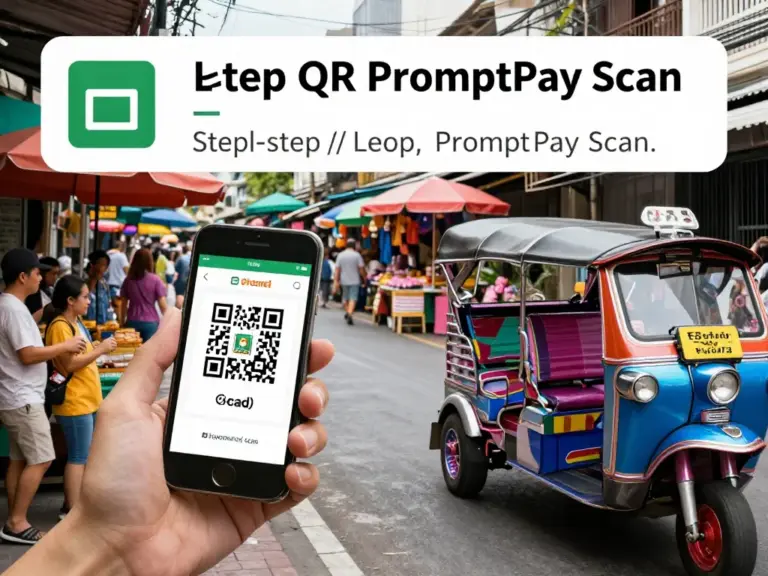
- Open your App: Launch your banking or payment app that supports cross-border QR payments.
- Scan the Code: Point your camera at the vendor’s PromptPay QR code.
- Verify the Name: The app will display the vendor’s name (often in Thai, sometimes English). Ensure the amount is correct.
- Confirm: Slide or click to pay. The vendor will usually receive an instant notification or ask to see your ‘e-slip’ (screenshot of the success page).
Using Credit and Debit Cards at Shops and Restaurants
In major cities like Bangkok, Chiang Mai, and Phuket, credit cards (Visa and Mastercard) are widely accepted in shopping malls, supermarkets, and established restaurants. However, there are nuances to Paying Like a Local when using plastic.
| Location Type | Card Acceptance | Notes |
|---|---|---|
| Malls & Department Stores | High | Contactless (PayWave) is common. |
| Fine Dining Restaurants | High | Check for ‘Service Charge’ before tipping. |
| Convenience Stores (7-Eleven) | Medium | Often has a minimum spend (e.g., 200 THB). |
| Local ‘Mom & Pop’ Shops | Low | Usually cash or QR only. |
Avoid DCC: When a machine asks if you want to pay in your ‘Home Currency’ or ‘Thai Baht,’ always choose Thai Baht. This allows your home bank to handle the conversion, which is almost always cheaper than the merchant’s Dynamic Currency Conversion (DCC) rate.
Tips for Tuk-Tuks, Markets, and Street Vendors
This is where the real local experience happens. Street food stalls and markets are the soul of Thailand, but they require a different approach to payments. Paying Like a Local here means being prepared with the right denominations.
- Street Food: Most street food vendors now accept QR PromptPay. If paying cash, try to use 20, 50, or 100 Baht notes. Handing over a 1,000 Baht note for a 50 Baht pad thai is considered poor etiquette as the vendor may not have enough change.
- Tuk-Tuks & Taxis: Always agree on the price before getting into a Tuk-Tuk. For taxis, insist on the meter. While some drivers accept QR, many still prefer cash. Use the ‘Grab’ or ‘Bolt’ apps to link your credit card for a seamless, card-based transport experience.
- Night Markets: Haggling is common in non-food market stalls. Once a price is settled, QR is highly preferred by vendors to avoid handling cash while cooking or managing stock.
คำถามที่พบบ่อย (FAQ)
Can I use my US/UK banking app to scan Thai QR codes?
Currently, most standard US or UK banking apps do not support the PromptPay network directly. You should rely on credit cards for larger purchases and cash for small vendors, or use a travel-specific app that supports Thai QR payments.
Is it safe to use my credit card in Thailand?
Yes, it is generally safe, especially in reputable establishments. To pay like a local safely, use contactless payments where possible and never let your card leave your sight.
Should I tip in Thailand?
Tipping is not strictly mandatory but is highly appreciated. In small local spots, leaving the change (5-10 Baht) is common. In upscale restaurants, a 10% service charge is often already included in the bill.
What should I do if a vendor’s QR code doesn’t work?
Always have a ‘Plan B’ cash reserve. Connectivity issues or app maintenance can occasionally cause QR failures. Carrying 500-1,000 Baht in cash is a safe backup.
References
- Cashless in Thailand: How to Use QR PromptPay, Cards, and ATMs Safely and Easily as a Visitor
- How Thailand’s Cashless Ecosystem Works: PromptPay, ewallets, card acceptance, and where QR payments fit in
- Preparing Before You Travel: Setting up international cards, using PromptPay (can visitors register?), and e-wallet alternatives